Page 1 of 1
ShowDriveLettersFirst no longer works for network drives
Posted: 17 Feb 2025 13:20
by R2X
Since a few weeks the registry entry "ShowDriveLettersFirst" is ignored if the drive is a network drive:
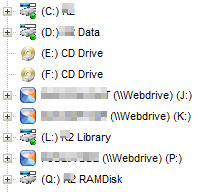
In Windows Explorer:
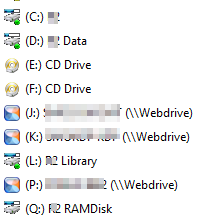
There were also problems with the icons, but that seems to be working again now.
Re: ShowDriveLettersFirst no longer works for network drives
Posted: 17 Feb 2025 16:38
by admin
Which version are you using?
Re: ShowDriveLettersFirst no longer works for network drives
Posted: 17 Feb 2025 20:13
by AgentSmith007
R2X wrote: ↑17 Feb 2025 13:20
Since a few weeks the registry entry "ShowDriveLettersFirst" is ignored if the drive is a network drive:
I was the first (I think) to scream about this when version number went from 26.70.XXXX to 26.80.XXXX. But our master fixed it in a few updates.
It works great with the latest version of 26.90.0000.
Kudos to master.
Re: ShowDriveLettersFirst no longer works for network drives
Posted: 17 Feb 2025 20:39
by R2X
admin wrote: ↑17 Feb 2025 16:38
Which version are you using?
26.90.0000
I use a software to map cloud accounts as network drives. Does this perhaps make a difference to normal network drives?
Until the previous version (26.80.0500) , the icon for this particular software did not work either. With all other icons I had no problems.
Re: ShowDriveLettersFirst no longer works for network drives
Posted: 18 Feb 2025 08:43
by admin
I don't know how that software works, but unchecking Configuration | General | Safety Belts, Network | Network | Assume that mapped network drives are available should solve your issues.
Re: ShowDriveLettersFirst no longer works for network drives
Posted: 18 Feb 2025 10:00
by R2X
admin wrote: ↑18 Feb 2025 08:43
I don't know how that software works, but
unchecking
Configuration | General | Safety Belts, Network | Network | Assume that mapped network drives are available should solve your issues.
That worked immediately. Thank you very much!