Hard link icon display problem
Posted: 22 Oct 2024 04:10
Version Windows 11 Professional
Version number 24H2
Installation date 2024/10/20
Operating system version 26100.2033
Serial number PF2BJTFV
Experience Windows Feature Experience Pack 1000.26100.23.0
Link Shell Extension
Official website: https://schinagl.priv.at/nt/hardlinkshe ... nsion.html
It is a tool that can display hard links, directory links, symbolic links and other file types in the lower left corner of the file icon. In 23H2, the icons of the created hard links, directory links and other files can be displayed normally, but after updating to 24H2, it cannot be seen in xplorer. It can only display the shortcut icon in the directory connection file category similar to the default shortcut icon of Windows Explorer. However, Windows Explorer can distinguish and display them normally.
windows
https://i.postimg.cc/CMmGFnGz/2024-10-22-100044.png

xyplorer
https://i.postimg.cc/wMfLFnqh/2024-10-22-100148.png
Version number 24H2
Installation date 2024/10/20
Operating system version 26100.2033
Serial number PF2BJTFV
Experience Windows Feature Experience Pack 1000.26100.23.0
Link Shell Extension
Official website: https://schinagl.priv.at/nt/hardlinkshe ... nsion.html
It is a tool that can display hard links, directory links, symbolic links and other file types in the lower left corner of the file icon. In 23H2, the icons of the created hard links, directory links and other files can be displayed normally, but after updating to 24H2, it cannot be seen in xplorer. It can only display the shortcut icon in the directory connection file category similar to the default shortcut icon of Windows Explorer. However, Windows Explorer can distinguish and display them normally.
windows
https://i.postimg.cc/CMmGFnGz/2024-10-22-100044.png
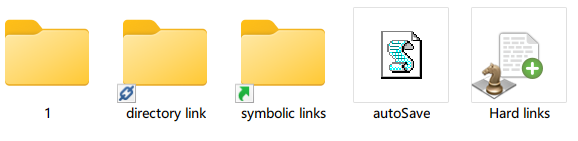
xyplorer
https://i.postimg.cc/wMfLFnqh/2024-10-22-100148.png
