Page 1 of 1
Tiny Menu Icons
Posted: 31 Oct 2022 06:57
by dogeatdog
I am not sure if others have experienced this but i have tiny menu bar icons - see attached
i use session manager and upgraded to the latest to see if it fixed the issue, it didnt. i am not sure if its an XY issue or the session manager causing it.
any help is appreciated as its impossible to read.
Re: Tiny Menu Icons
Posted: 31 Oct 2022 09:59
by CyGho
You can change the icon size in the Options menu of the toolbar:

Re: Tiny Menu Icons
Posted: 01 Nov 2022 11:37
by dogeatdog
Thank you for the response, i have changed the size and the other items resize but not the File, Edit etc. it randomly happened one day and those buttons went tiny and never came back to original size
Re: Tiny Menu Icons
Posted: 01 Nov 2022 15:01
by Horst
May be you scrolled with the mouse wheel while over the menu.
This will change the size.
Re: Tiny Menu Icons
Posted: 05 Nov 2022 03:36
by dogeatdog
Thank you for the response, i can confirm its not zoomed out, i am lost on how to reset it.
Re: Tiny Menu Icons
Posted: 05 Nov 2022 05:41
by highend
Execute this from the addressbar:
editconf 5, "ToolbarIndexButtonSet=*";
Click the Edit button
Replace the value after the = with a 0
Click the OK button
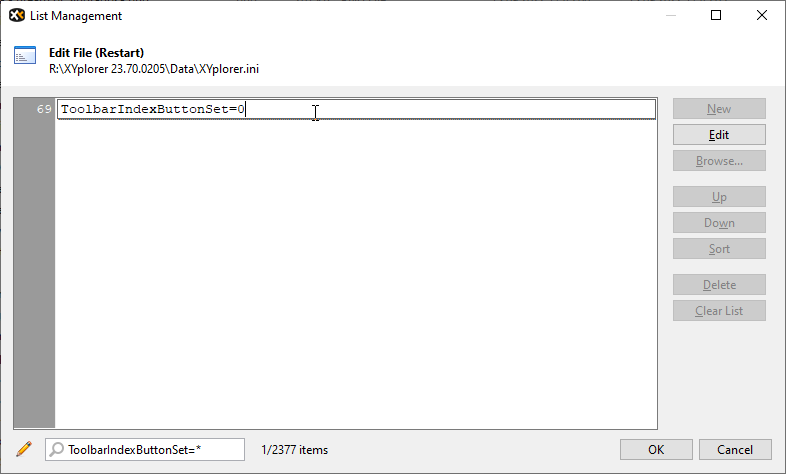
- 1.png (10 KiB) Viewed 3342 times
Re: Tiny Menu Icons
Posted: 05 Nov 2022 15:27
by dogeatdog
Thanks Highend, i just tried that, value was already at 0. I clicked okay, XY restarted and the icons are still tiny.