Page 1 of 1
Some file associations icons do not show
Posted: 26 May 2022 14:08
by kr00bi
Some file associations icons do not show in XYplorer but they do show in Windows File explorer.
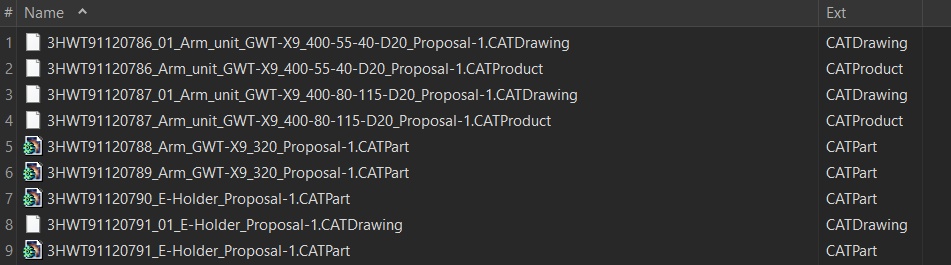
- XYplorer_missing_icons.jpg (74.92 KiB) Viewed 2525 times
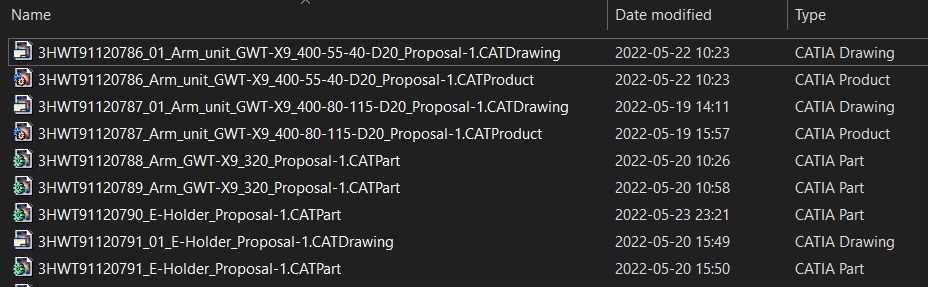
- XYplorer_missing_icons_WindowsFE.jpg (104.46 KiB) Viewed 2525 times
I tried to View + Caches + Refresh Icons but without success.
I have that behaviour on 2 computers.
Are there any settings/cache... to change/clear?
C:\Users\krz\AppData\Roaming\XYplorer\Icons\ is empty
br /Krz
Re: Some file associations icons do not show
Posted: 27 May 2022 02:21
by RalphM
Same here, it seems that Catia registers the icons for .CatPart differently than for the rest of its extensions.
Don't know though how M$ manages to display them
Re: Some file associations icons do not show
Posted: 27 May 2022 07:53
by kr00bi
and if I define customized icons:
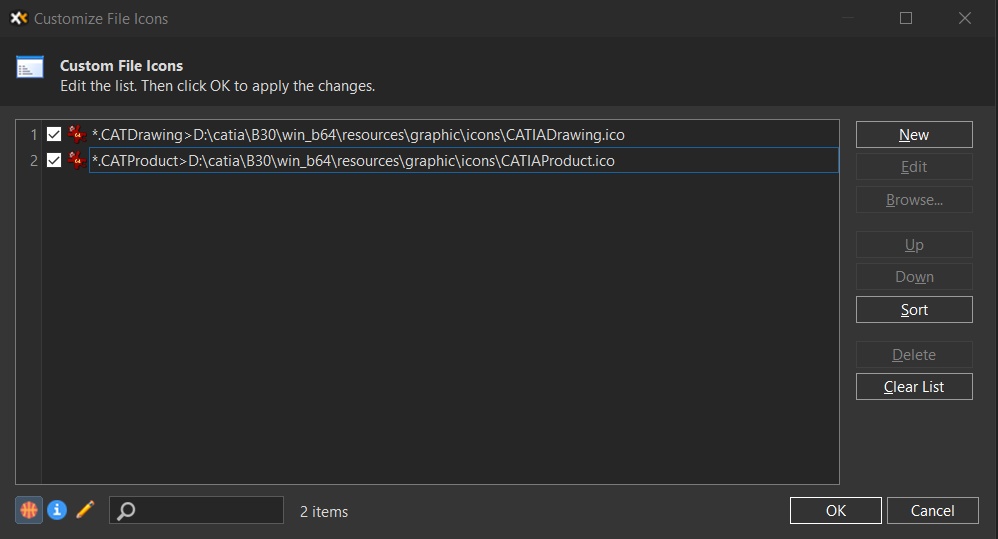
- XYplorer_missing_icons_customized_panel.jpg (52.96 KiB) Viewed 2491 times
Then the icons shows wrong, they show icon of *.ico associated app. That I would call a bug then.
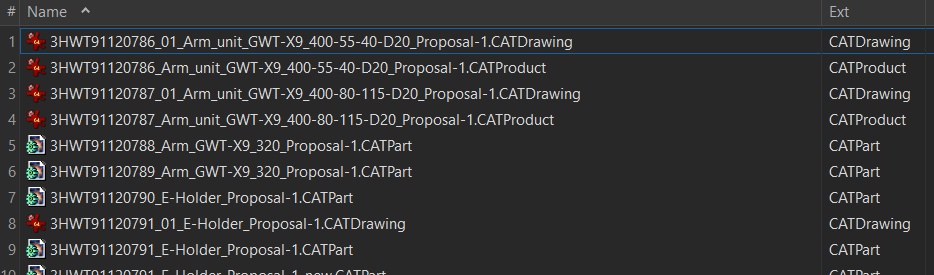
- XYplorer_missing_icons_customized_wrong.jpg (84.9 KiB) Viewed 2491 times
Re: Some file associations icons do not show
Posted: 27 May 2022 15:58
by admin
Should work in next beta.
Re: Some file associations icons do not show
Posted: 28 May 2022 14:05
by RalphM
23.10.0009 still looks the same on my system.
No CFI defined though.
Re: Some file associations icons do not show
Posted: 28 May 2022 14:37
by admin
I guess I'll fix it again.
Re: Some file associations icons do not show
Posted: 29 May 2022 04:17
by RalphM
23.10.0011 fixed it for me, thanks.


Re: Some file associations icons do not show
Posted: 30 Oct 2023 14:08
by calude
My turn
as you can see only win explorer shows the affinity icons. XY fails

- missing icons.png (97.01 KiB) Viewed 1193 times
1 is from my everyday xyplorer
2 is ::fresh
3 is win11 file explorer
win11 64 pro uptodate
xyplorer 25.00.0200
affinity photo2 affinity Design2 affinity publisher2 they are microsoft store apps
Claude
Re: Some file associations icons do not show
Posted: 30 Oct 2023 14:12
by admin
This can only mean that Affinity is not installed correctly. MS advises vendors to install their applications in both the 32-bit and 64-bit branches of the registry.