Page 1 of 2
How do I change the toolbar icon size?
Posted: 26 Apr 2008 00:47
by txfinfan
Great product.
Would like to know how to change the size of the icons shown in the toolbar.
Posted: 26 Apr 2008 01:12
by j_c_hallgren
Hi and welcome to the XY world!

Unfortunately, as far as I know, at this time, you can't do this, but it has been requested a couple of times before, and may be incorporated into CTB (Custom Tool Bar) which is an upcoming feature...CTB was discussed in a thread that started about another issue so here's a link to it:
http://www.xyplorer.com/xyfc/viewtopic.php?t=2296
Re: How do I change the toolbar icon size?
Posted: 26 Apr 2008 09:22
by admin
txfinfan wrote:Would like to know how to change the size of the icons shown in the toolbar.
You can't. At the moment. But I'm aware of the demand.
There are two rather minor problems on the way to bigger icons:
(1) The layout would look a bit deranged. The toolbar in either of the 4 available layouts shares a row with another element, either address bar or tabs. Now try a screen design of XY with larger buttons... does not look very nice.
(2) I would have to rr-create ALL icons in a larger scale (because simply stretching them would not look very good). Maybe this could be handled in form of a user-submittable resource file... then YOU do the work.

Re: How do I change the toolbar icon size?
Posted: 26 Apr 2008 09:45
by j_c_hallgren
admin wrote:(1) The layout would look a bit deranged. The toolbar in either of the 4 available layouts shares a row with another element, either address bar or tabs. Now try a screen design of XY with larger buttons... does not look very nice.
Maybe we need a new variant? The combination that isn't available is "Toolbar"/"Tabs & Address Bar" and its inverse...I've get a very short AB as it is, and wouldn't mind giving up a bit of tab space to get more TB icons...
admin wrote:(2) I would have to rr-create ALL icons in a larger scale (because simply stretching them would not look very good). Maybe this could be handled in form of a user-submittable resource file... then YOU do the work.
If people wanted all kinds of sizes, I could see this being an issue, but many apps (incl Windows) give a simple choice of large/small, so if that was available, it should satisfy most of those who asked for it.
Re: How do I change the toolbar icon size?
Posted: 26 Apr 2008 10:14
by admin
j_c_hallgren wrote:admin wrote:(1) The layout would look a bit deranged. The toolbar in either of the 4 available layouts shares a row with another element, either address bar or tabs. Now try a screen design of XY with larger buttons... does not look very nice.
Maybe we need a new variant? The combination that isn't available is "Toolbar"/"Tabs & Address Bar" and its inverse...I've get a very short AB as it is, and wouldn't mind giving up a bit of tab space to get more TB icons...
admin wrote:(2) I would have to rr-create ALL icons in a larger scale (because simply stretching them would not look very good). Maybe this could be handled in form of a user-submittable resource file... then YOU do the work.
If people wanted all kinds of sizes, I could see this being an issue, but many apps (incl Windows) give a simple choice of large/small, so if that was available, it should satisfy most of those who asked for it.
(1) Yep, that would do.
(2) Okay, but to create only one new set, say in 32x32, would take days...
Re: How do I change the toolbar icon size?
Posted: 26 Apr 2008 10:22
by j_c_hallgren
admin wrote:(2) Okay, but to create only one new set, say in 32x32, would take days...
But considering how long folks have been asking for this, maybe if you just did a couple per day, and it took 2-3 weeks to complete, I don't think anybody would mind! As long as they knew it was "in process" and had some proposed completion date, that would still be less delay than most apps take for updates!
Re: How do I change the toolbar icon size?
Posted: 30 Jan 2009 04:38
by j_c_hallgren
admin wrote:j_c_hallgren wrote:Maybe we need a new variant? The combination that isn't available is "Toolbar"/"Tabs & Address Bar" and its inverse...I've get a very short AB as it is, and wouldn't mind giving up a bit of tab space to get more TB icons...
(1) Yep, that would do.
Since I pointed to this thead in my reply in
http://www.xyplorer.com/xyfc/viewtopic.php?f=5&t=3340, and we keep adding new TB icons for new features which compounds the problem, I'm wondering if some action can be taken on my suggestion for new option above?
Re: How do I change the toolbar icon size?
Posted: 30 Jan 2009 05:04
by lastnikita
that would be great ! I'm sure we can find some good and free icons so that you don't need to redesign them all..
I don't see the problem with layout neither..
I do have address + toolbar right now, and it would not be a problem for me to keep that layout with bigger icons. would be better if the address bar gets vertically centered then, I guess.
another option would be this kind of layout, if it's possible:
http://img299.imageshack.us/my.php?imag ... 995ql4.png
Re: How do I change the toolbar icon size?
Posted: 30 Jan 2009 05:31
by j_c_hallgren
lastnikita wrote:that would be great ! I'm sure we can find some good and free icons so that you don't need to redesign them all..

Not going to happen! Don is a graphic designer as well, so he's going to want to do it himself...though he may take some ideas from other places, I would guess.
Suggest you investigate PhotoBucket for your image storage! That's what I use...Imageshack showed me ads and pop-ups and made seeing the screen shot more difficult.
Re: How do I change the toolbar icon size?
Posted: 30 Jan 2009 05:44
by lastnikita
Sure, I'll try to remember its name
ps: suggest you try some ads/pop-up blocker, I did not see those

(using FF & adblock plus, but the latter is unconfigured so not sure if it's really active or not)
Re: How do I change the toolbar icon size?
Posted: 30 Jan 2009 05:51
by j_c_hallgren
lastnikita wrote:ps: suggest you try some ads/pop-up blocker, I did not see those
(using FF & adblock plus, but the latter is unconfigured so not sure if it's really active or not)
The ads were embedded in the page and I use Google Toolbar as blocker but it had one that got around it....I use IE6 (yes, it's old but also latest vers that runs on my sys) as my primary browser, and have tried FF but don't like it...I use Opera as alternate, but not for this forum.
Re: How do I change the toolbar icon size?
Posted: 30 Jan 2009 06:14
by lastnikita
the power of firefox resides in its extensions..
I also prefer opera or IE for the core part, but FF extensions are like XY for file browsing, they save you time and hassle
Re: How do I change the toolbar icon size?
Posted: 30 Jan 2009 06:36
by j_c_hallgren
Well, this has gottten rather off-topic but here's a screenshot of how my IE6 toolbar setup is viwing this thread:
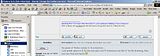
What I haven't yet found in FF is a way to replicate all those TB functions in the same amount of space...I use the IE Developer ToolBar fairly often, and the Google TB constantly...also, maybe 98% of the time, I have my Favoriyes open in side frame, and that doesn't seem as possible in FF...maybe I'm just stuck on what I've used for yrs cause it works for me!

Re: How do I change the toolbar icon size?
Posted: 30 Jan 2009 07:33
by lastnikita
Sorry for the off-topic

well I don't know dev toolbar so I can't say for sure, but I guess they have one of the same size and I know for sure google has a bar for every browser !
of course you can display your favorites on the left side too
Re: How do I change the toolbar icon size?
Posted: 30 Jan 2009 08:51
by admin
lastnikita wrote:that would be great ! I'm sure we can find some good and free icons so that you don't need to redesign them all..
I don't see the problem with layout neither..
I do have address + toolbar right now, and it would not be a problem for me to keep that layout with bigger icons. would be better if the address bar gets vertically centered then, I guess.
another option would be this kind of layout, if it's possible:
http://img299.imageshack.us/my.php?imag ... 995ql4.png
UAAAAH!
1. imageshack =

horror crap, please do not use this!
2. XY in classic mode
3. your toolbart design


I'm aware of the toolbar needs. They will be addressed.

