Page 1 of 1
Cannot preview epubs in XYPlorer with SumatraPDF.
Posted: 15 Aug 2021 04:55
by Morpheus23
Hi. I'm having problems with xyplorer when it comes to previewing .epub in xyplorer.
I am using Sumatrapdf as I've seen suggested here in numerous threads ( the custom one downloaded from mega ). I can see the CLSID for the 64 bit preview handler using Shellexview, and I have stuck it in User defined preview handlers *.epub, EPUB File > {80C4E4B1-2B0F-40D5-95AF-BE7B57FEA4F9}, but I still can't get thumbnails for epub. If I move the .epub file to my desktop, it turns into a thumbnail, so I know Sumatra is working within Windows itself.
Any suggestions?
Re: Cannot preview epubs in XYPlorer with SumatraPDF.
Posted: 15 Aug 2021 05:59
by RalphM
Welcome to the forum.
While this is not my area of expertise, I would assume that in order to see the thumbs in XY you would need to use the 32-bit preview handler (as XY is 32-bit).
Might be worth a try.
Re: Cannot preview epubs in XYPlorer with SumatraPDF.
Posted: 15 Aug 2021 06:15
by Morpheus23
Yeah, I think that's the problem, but I can't ever see any 32bit preview handlers from Sumatra.
I've tried installing both the 64 bit and the 32 bit applications, but shellexview never shows any 32 bit preview handlers for Sumatra.
Only 64 bit. I have "Use 64-bit preview handlers for preview" and "Fall back to preview handlers of the other bitness" checked.
I'm using 64 bit Windows 10.
If anyone else can see the 32 bit epub preview handler for Sumatra, could you please post the CLSID?
EDIT: In the end, I got it working with Darkthumbs 32 bit previewer.
Nice program, but you really need to move to 64 bit. It's the 21st Century. Windows 11 won't even come in a 32 bit version.
Re: Cannot preview epubs in XYPlorer with SumatraPDF.
Posted: 15 Aug 2021 09:21
by jupe
I agree with you a x64 version of XYplorer would be fantastic, but it isn't possible currently without a complete re-write of the software. What you wanted to do was already possible anyway, but would have required a couple extra initial setup steps.
Just because there is only going to be an x64 version of Win11 doesn't mean it won't run x32 apps anymore.
Re: Cannot preview epubs in XYPlorer with SumatraPDF.
Posted: 15 Aug 2021 09:34
by Horst
The SumatraPDF x64 installation works fine as preview handler and thumbnail provider in XY and Windows Explorer here.
XY has no problem to use this x64 components.
Of course the option to provide previews in the SumatraPDF installer must be set.
I have set the following XY options
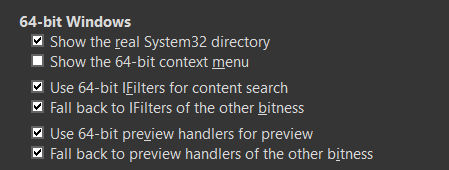
- Screenshot - 15.08.2021 , 09_33_30.png (7.77 KiB) Viewed 2255 times
Re: Cannot preview epubs in XYPlorer with SumatraPDF.
Posted: 15 Aug 2021 11:19
by highend
Previewing and thumbnailing with the alternative version of Sumatra for epub works fine (64-bit installation only)...
You don't enter a clsid in User-Defined Preview Handlers but just add epub in Preview as Thumbnail
(and ofc you need Configuration | Other | Shell Integration | 64-bit Windows | Use 64-bit preview handlers for preview ticked)
Re: Cannot preview epubs in XYPlorer with SumatraPDF.
Posted: 19 Aug 2021 05:41
by Morpheus23
Thanks for the replies!
I never could get Sumatra to work. I tried everything, but it just wouldn't work in xyplorer.
Used Dark thumbs in the end.
Any preview helpers that will show azw3?