Page 1 of 1
Sync Script: Syntax error for filters to exclude certain folders
Posted: 11 Dec 2020 08:37
by Emre
Hello,
I'm using sync scripts to backup my working folders to certain locations on my PC. I generally have an "_EX" folder in everywhere to keep the older versions archived.
I have a working sync script here, I'm tring to add a fiter to exclude the "_EX" folders to sae time and space. But I keep getting syntax errors for this. Can you help me what is worng with my filter section? (censored path adresses too keep simple)
Code: Select all
sync "\\dc\Server\abc\def", "D:\OneDrive\xyz", 1, 0, 4, "c", "-*.bak|-*.dwl|-*.dwl2|-*.txt|-*.skb|-*\_EX";
As usual thanks in advance....
Re: Sync Script: Syntax error for filters to exclude certain folders
Posted: 11 Dec 2020 08:45
by highend
I'll give you a hint: Are all your parameters in the correct position?
Re: Sync Script: Syntax error for filters to exclude certain folders
Posted: 11 Dec 2020 09:01
by Emre
highend wrote: ↑11 Dec 2020 08:45
I'll give you a hint: Are all your parameters in the
correct position?
Ah.. So I learned to add "7:=". Thanks alot!!!
But I was expecting it to delete the previously synced _EX folders. (I'm selecting it via the dialog box when the script is ran)
Is my syntax searching for any _EX folder or an absolute path? I need to exlude any _EX folder with contents. (just saw that it is still syncing the _EX folders)
Re: Sync Script: Syntax error for filters to exclude certain folders
Posted: 11 Dec 2020 09:04
by highend
Read the help file again. Where does the backslash needs to be for folders? Not where you've placed it...
Re: Sync Script: Syntax error for filters to exclude certain folders
Posted: 11 Dec 2020 09:08
by Emre
highend wrote: ↑11 Dec 2020 09:04
Read the help file again. Where does the backslash needs to be for folders? Not where you've placed it...
I tried these alternatives non of them worked. Sorry the help file was not very clear about this, now I'm undestand the backlash has to be at the end but non of these worked:
Code: Select all
7:="-*.bak|-*.dwl|-*.dwl2|-*.txt|-*.skb|-*_EX\";
7:="-*.bak|-*.dwl|-*.dwl2|-*.txt|-*.skb|-_EX\";
Re: Sync Script: Syntax error for filters to exclude certain folders
Posted: 11 Dec 2020 09:14
by highend
-*_EX\ works absolutely fine here. All folders called "_EX" are excluded from sync regardless where in the hierarchy they are
Re: Sync Script: Syntax error for filters to exclude certain folders
Posted: 11 Dec 2020 09:21
by Emre
highend wrote: ↑11 Dec 2020 09:14
-*_EX\ works absolutely fine here. All folders called "_EX" are excluded from sync regardless where in the hierarchy they are
Interesting because I even tried it to take it to the beginning of the filter script. I'm deleting the ex folder in the target. The script still copies the folder from the source. In this case I have an odd situation.
Code: Select all
7:="-*_EX\|-*.bak|-*.dwl|-*.dwl2|-*.txt|-*.skb"
Re: Sync Script: Syntax error for filters to exclude certain folders
Posted: 11 Dec 2020 09:27
by highend
Doesn't happen here and mine is still at the end of the filter definition...
Show a part of the source folder structure that contains an "_EX" folder.
Use a branch view for this.
I guess
sync is broken. At least as I understand it.
If the files / folders aren't already in the destination folder, they aren't copied over when excluded.
But if they already exist because a filter was added after the first sync, they aren't deleted.
Target folder. The contents of this folder will be made identical to those of the source folder
Re: Sync Script: Syntax error for filters to exclude certain folders
Posted: 11 Dec 2020 09:48
by Emre
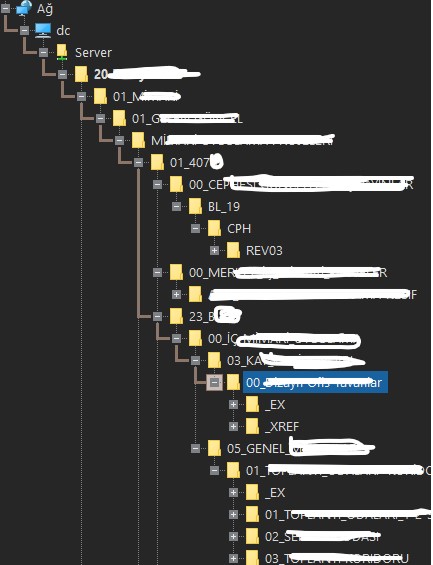
Ok I'm posting a "censored" structure example here.
So many ex folders here.
- structure_ex.jpg (48.85 KiB) Viewed 3438 times
I can live with sync not deleting previously synced folders.
Re: Sync Script: Syntax error for filters to exclude certain folders
Posted: 11 Dec 2020 09:58
by highend
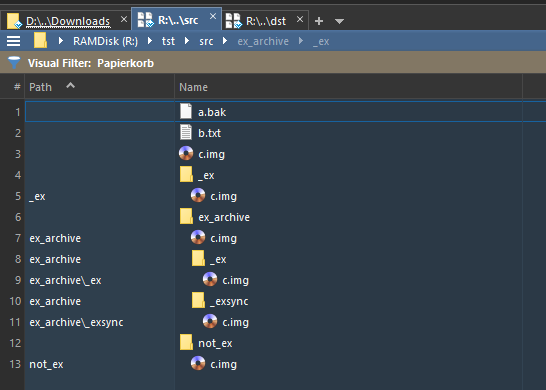
Src folder, it contains 2 _ex folders, one in the root and one under "ex_archive"
- src.png (16.37 KiB) Viewed 3434 times
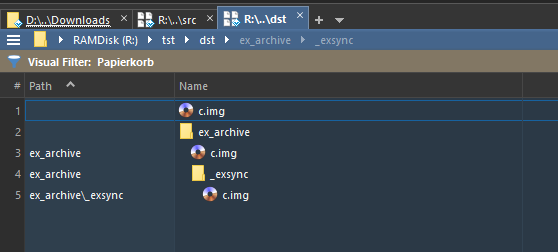
Dst was empty and after syncing
- dst.png (10.12 KiB) Viewed 3434 times
The log file states:
Code: Select all
Sync Folders from 11.12.2020 09:54:56

From: R:\tst\src\
To:   R:\tst\dst\

Filter: -*.bak|-*.dwl|-*.dwl2|-*.txt|-*.skb|-*_EX\

Files processed: 3 (3 new, 0 over, 0 skip), 2 dir, 0 del, 0 ren
Bytes copied:    0 bytes
Transfer rate:   290 files/sec
Created folders: 2
Remarks:         Sync Folders completed in 13,1 ms

------------------------------------------------------------------------

Processed files:

New  R:\tst\src\c.img -> R:\tst\dst\c.img
New  R:\tst\src\ex_archive\c.img -> R:\tst\dst\ex_archive\c.img
New  R:\tst\src\ex_archive\_exsync\c.img -> R:\tst\dst\ex_archive\_exsync\c.img

------------------------------------------------------------------------

Created folders:

CreateDir R:\tst\dst\ex_archive\
CreateDir R:\tst\dst\ex_archive\_exsync\
Re: Sync Script: Syntax error for filters to exclude certain folders
Posted: 11 Dec 2020 10:43
by Emre
Well, I just added a log file to the script, just to see the results.
Somehow it works now

. The is some kind of bug in sync, but I will not change the script, leave the logfile attribute there

.
Code: Select all
sync "\\dc\Server\abc", "D:\OneDrive\xyz", 1, 0, 4, "c", "D:\xylog.txt", 7:="-*_EX\|-*.bak|-*.dwl|-*.dwl2|-*.txt|-*.skb";
Thanks for the help @highend.
EDIT: No it is unreliable, added the filter to my other backup script / not skipping EX folders.
Re: Sync Script: Syntax error for filters to exclude certain folders
Posted: 11 Dec 2020 10:54
by jupe
FYI now you have added the log parameter, the 7:= should be superfluous, previously it could have been excluded if you had added a comma instead, which would have supplied the parameters in the required order, as documented in the help file.