Page 1 of 1
My Xyplorer Does Not Preview On Hover
Posted: 28 Dec 2019 18:35
by Anklebuster
Hi,
I am using Xyplorer 20.60.0300.
I have customized my columns to show only Name, Extension, Size, Modified and Created.
Is there another column I need to include for the Hover to work?
If it is not a column, is it possible that the window is off-screen?
If it matters, I have a script that toggles the view. do I need to delete that?
::#302
Cheers,
Mitch
Re: My Xyplorer Does Not Preview On Hover
Posted: 28 Dec 2019 18:41
by highend
You are hovering over the icon of a file?
Re: My Xyplorer Does Not Preview On Hover
Posted: 28 Dec 2019 18:43
by Anklebuster
Yes, to all.
Re: My Xyplorer Does Not Preview On Hover
Posted: 28 Dec 2019 18:45
by highend
In which view are you and which file are you hovering on?
Re: My Xyplorer Does Not Preview On Hover
Posted: 28 Dec 2019 19:05
by Anklebuster
A PNG file. Dual Pane view (if that's what you mean?)
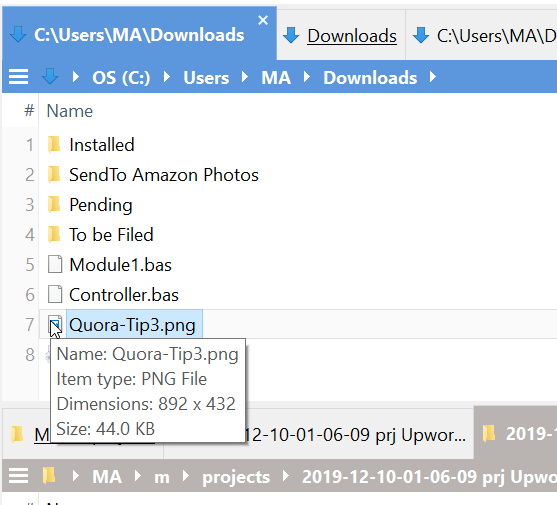
- XyHover.png (24.48 KiB) Viewed 2017 times
Re: My Xyplorer Does Not Preview On Hover
Posted: 28 Dec 2019 19:12
by highend
Configuration | Information | File Info Tips | [x] Show Hover Box
Re: My Xyplorer Does Not Preview On Hover
Posted: 28 Dec 2019 19:15
by Anklebuster
Thank you!!
Did I miss this step while reading the What's New?
Cheers,
Mitch
Re: My Xyplorer Does Not Preview On Hover
Posted: 28 Dec 2019 19:24
by highend
Yes, you did...
What’s New in 19.00?
released 24-May-2018
Re: My Xyplorer Does Not Preview On Hover
Posted: 28 Dec 2019 19:41
by Anklebuster
Ha-ha. Actually, the website shows:
If it’s not turned on yet turn it on now: Configuration | General | Menus, Mouse, Usability | Usability | Highlight hovered items.
If does not mention your step with:
Configuration | Information | File Info Tips | [x] Show Hover Box
I had to do both.
Cheers,
Mitch