[SOLVED] New tab sometimes opens in the current tab
Posted: 06 Dec 2019 05:50
Hello,
I'm experiencing the following issue: sometimes (maybe 5-10% of the time), when trying to open a subfolder in a new tab, that subfolder is not opened in a new tab, but instead changes the location of the current tab.
This happens both when using the middle mouse button to open a subfolder, and when a tab is locked and I'm using double-click to open a new tab.
To better visualize what I mean, here's a gif showing the latter case:
As you can see, the current folder "Downloads" (Z:\Downloads\) is locked. The first two times I'm double-clicking with the left mouse button, the "Test Folder" opens in in a new tab as it's supposed to (then I'm closing the tab). The third time, however, it fails and changes the locked tab's location from to Z:\Downloads\Test Folder\.
I'm currently running version 20.60.0200, but this has been happening ever since I started using XYplorer.
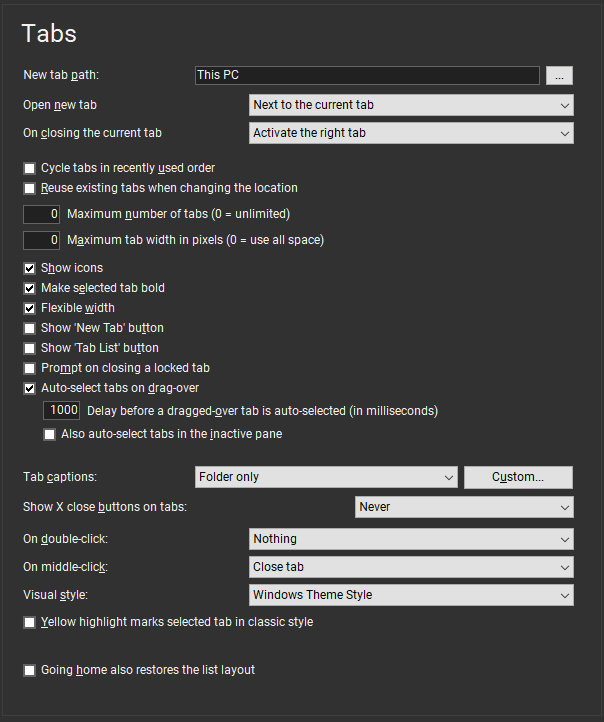
Here are my Tab settings in case it's relevant: https://pictshare.net/n10118.png.
Let me know if you need anything else.
Best regards.
I'm experiencing the following issue: sometimes (maybe 5-10% of the time), when trying to open a subfolder in a new tab, that subfolder is not opened in a new tab, but instead changes the location of the current tab.
This happens both when using the middle mouse button to open a subfolder, and when a tab is locked and I'm using double-click to open a new tab.
To better visualize what I mean, here's a gif showing the latter case:
- 4ef54e2b-2d1f-4445-b557-7b1fb00a9955.gif (57.61 KiB) Viewed 1064 times
I'm currently running version 20.60.0200, but this has been happening ever since I started using XYplorer.
Here are my Tab settings in case it's relevant: https://pictshare.net/n10118.png.
Let me know if you need anything else.
Best regards.