Page 1 of 1
Display shell's context menu when clicking below files in file list
Posted: 22 Nov 2018 10:30
by tkab
I'd like to display the shell's context menu when clicking on the white space below all files in the file list view. Ideally in a way that does not lose XYplorer's own context menu, e.g., by using Ctrl-Right Mouse Button for the shell's menu.
Background: I'm using TortoiseSVN and want to be able to use SVN update on the folder without locating to the folder in the tree first.
Re: Display shell's context menu when clicking below files in file list
Posted: 22 Nov 2018 10:50
by highend
There is this tweak:
Code: Select all
; Tweak: 0=Edit menu, 1=Folder's shell menu, 2=Favorites, 3=reserved, 4=Tabs, 5=FavFiles, 6=Script
CEA_ListRightClickOnWhite=0
which would display the necessary entries for TortoiseSVN when set to 1. But afaik this can't be triggered
without losing it's current menu apart from setting it to 6 and trying to recreate exactly what you need...
Re: Display shell's context menu when clicking below files in file list
Posted: 23 Nov 2018 15:23
by tkab
Thanks, that helped a lot. Now I'm missing XYplorer's menu entries (a bit), but I missed TortoiseSVN-update more...
Re: Display shell's context menu when clicking below files in file list
Posted: 08 Jan 2024 22:21
by elmonty
highend wrote: ↑22 Nov 2018 10:50
There is this tweak:
Code: Select all
; Tweak: 0=Edit menu, 1=Folder's shell menu, 2=Favorites, 3=reserved, 4=Tabs, 5=FavFiles, 6=Script
CEA_ListRightClickOnWhite=0
which would display the necessary entries for TortoiseSVN when set to 1.
This doesn't work.
Re: Display shell's context menu when clicking below files in file list
Posted: 08 Jan 2024 22:39
by highend
Great. So why don't you post a screenshot of what you actually see when invoking the click?
Re: Display shell's context menu when clicking below files in file list
Posted: 09 Jan 2024 15:23
by elmonty
Re: Display shell's context menu when clicking below files in file list
Posted: 09 Jan 2024 15:30
by highend
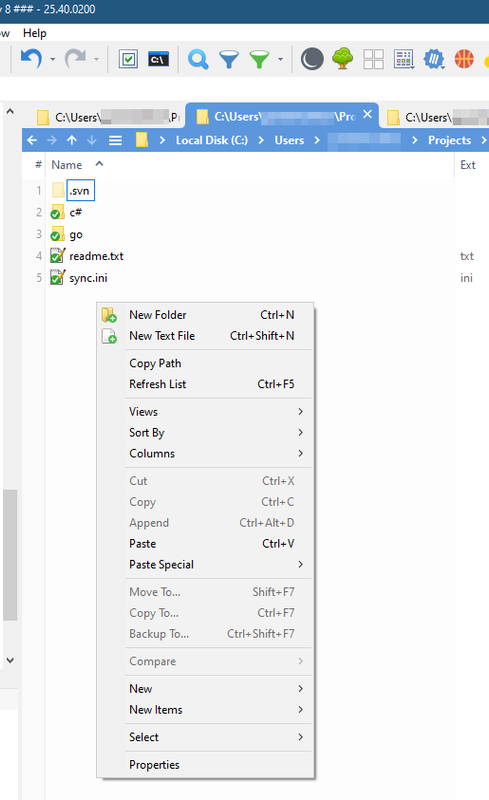
That's the edit menu...
Either set that .ini setting to 2 or configure it (correctly) in:
Configuration | General | Custom Event Actions | Clicking on White | Right-click on white in file list => Pop up folder's context menu
Re: Display shell's context menu when clicking below files in file list
Posted: 09 Jan 2024 15:47
by elmonty
highend wrote: ↑09 Jan 2024 15:30
That's the edit menu...
Either set that .ini setting to 2 or configure it (correctly) in:
Configuration | General | Custom Event Actions | Clicking on White | Right-click on white in file list => Pop up folder's context menu
Aha! That did it. Thank you!
Re: Display shell's context menu when clicking below files in file list
Posted: 16 Jan 2024 20:10
by elmonty
Why don't I see the "New" submenu for creating new files within the shell context menu?
Re: Display shell's context menu when clicking below files in file list
Posted: 16 Jan 2024 20:18
by highend
Because you've switched to "Pop up folder's context menu"? That doesn't contain the entry (neither does the Windows File Explorer when right clicking a folder...)