Page 1 of 1
Backup error - Out of string space error
Posted: 31 Mar 2018 06:51
by jjiron
I have received this error now for awhile. It appears to be an issue with the number of files.
My system has 32GB ram, Windows 7 pro 64 bit - Intel I7, same occurs Windows 10 PRo. XYPlorer version 18.90.0.100
Cannot tell the limit but so far
357,304 folders - 2,236,632 files
1.88 TB (2,068,398,900,476 bytes)
Source 8TB Drive + 32TB NAS
Result occurs while enumeration using "backup":
Error: 14 (0000000E)
Desc: Out of string space
DLL: 0
Proc: BuildLog@20
Source XYCOPY
XYVER: 2.10.0125
OS: Windows 7
Re: Backup error - Out of string space error
Posted: 13 Apr 2018 17:40
by admin
Okay, looks like you hit a physical wall there. Thanks for the report. This is not easy to fix though. I assume such large jobs have to be separated in sub-jobs. I won't have time for this very soon. So as a workaround you should separate the amount of data yourself (first half, then second half -- or smaller parts if that's not sufficient).
EDIT: Whoops, just saw that it happens in "BuildLog", so it should be enough to untick "Create log file" in"Configuration | File Operations | File Operations | Backup Operations | Configure..."
EDIT 2: In the next version you won't get this pretty useless message anymore. Creating the log will just silently fail (the message will be found within the log instead).
Re: Backup error - Out of string space error
Posted: 14 Apr 2018 00:55
by jjiron
See attached file:
Prior message error #14 occurred during enumeration before image (1) showed up
After unticking the "Create Log" box, Got to image (1)
After Clicking "OK" on image (1) - a few minutes later got image (2)
Click "close" on image (2) and image 3 ramains on the screen but does not seem to do anything.
I am using copy handler v2.10.0125, is this the correct one?
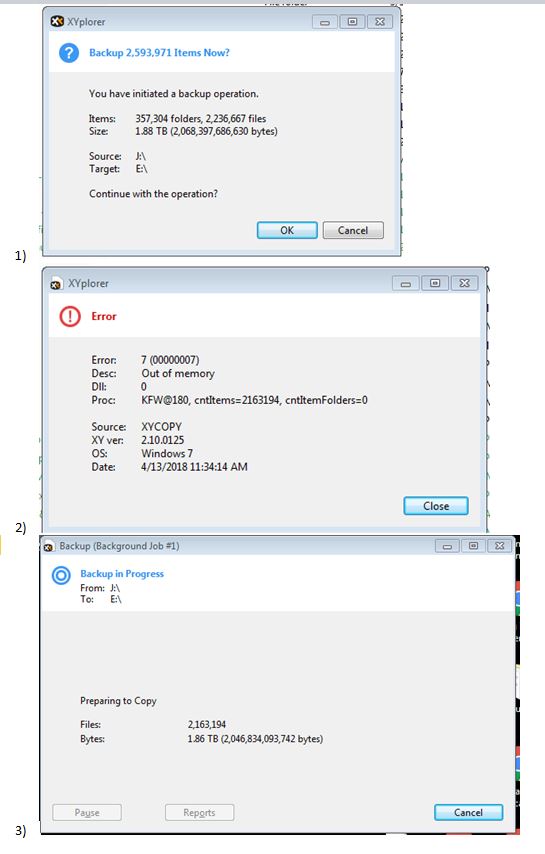
- Out of string error sequence
- XYPlorer error.JPG (50.84 KiB) Viewed 2223 times
Thanks for your time in advance.
Re: Backup error - Out of string space error
Posted: 14 Apr 2018 09:13
by admin
I see. Then I have to repeat what I striked through above:
Okay, looks like you hit a physical wall there. Thanks for the report. This is not easy to fix though. I assume such large jobs have to be separated in sub-jobs. I won't have time for this very soon. So as a workaround you should separate the amount of data yourself (first half, then second half -- or smaller parts if that's not sufficient).
Re: Backup error - Out of string space error
Posted: 14 Apr 2018 21:54
by Asta
jjiron wrote:
357,304 folders - 2,236,632 files
For copying so much files it'll be better to use a FTP based tool (like Filezilla (open source and free)). Don't you think ?
Re: Backup error - Out of string space error
Posted: 14 Apr 2018 22:26
by highend
FTP is probably not the fastest way, I'd vote for rsync

Re: Backup error - Out of string space error
Posted: 15 Apr 2018 22:09
by jjiron
Asta, all files are within my network, I use BACKUP to transfer for one NAS to another and maintain dates. FTP not an option.
Thanks
Asta wrote:jjiron wrote:
357,304 folders - 2,236,632 files
For copying so much files it'll be better to use a FTP based tool (like Filezilla (open source and free)). Don't you think ?
Re: Backup error - Out of string space error
Posted: 15 Apr 2018 22:10
by jjiron
Thanks for the time. I will try to split it.
How can I tell I am using the lastest handler?
admin wrote:I see. Then I have to repeat what I striked through above:
Okay, looks like you hit a physical wall there. Thanks for the report. This is not easy to fix though. I assume such large jobs have to be separated in sub-jobs. I won't have time for this very soon. So as a workaround you should separate the amount of data yourself (first half, then second half -- or smaller parts if that's not sufficient).
Re: Backup error - Out of string space error
Posted: 15 Apr 2018 22:14
by highend
What handler, XYcopy? The latest XY build always contains the latest version of XYcopy...