Magnifying Glass for images
Posted: 08 Mar 2018 14:32
hi,
is it possible to have an option Magnifying Glass for images in "preview pane" or/and in "floating preview pane"
demo gif :

The mouse wheel is used to change the files in "floating preview pane" (yes it's easy and fast) but not for zooming .... i think it's not good,
because zooming with the mouse wheel is more convient, zooming should be more fast and easy,
if you want see the next or preview images, you can do it in many way like swipe left or right (like a phone apps, and more convient for touch screen),
or you can click on the extrem left/right or the image to see the next (like on many website on internet)
(of course it's a point of view, can debate)
and by the way, the "mouse down blow up" do the thing, but if you want more detail, to see more closer than the native size of the picture ...
but i still think as an option can be good..
https://www.jqueryscript.net/tags.php?/Magnifier/

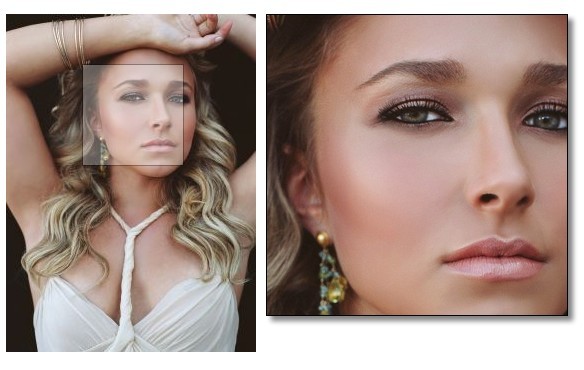
Thank you
is it possible to have an option Magnifying Glass for images in "preview pane" or/and in "floating preview pane"
demo gif :
The mouse wheel is used to change the files in "floating preview pane" (yes it's easy and fast) but not for zooming .... i think it's not good,
because zooming with the mouse wheel is more convient, zooming should be more fast and easy,
if you want see the next or preview images, you can do it in many way like swipe left or right (like a phone apps, and more convient for touch screen),
or you can click on the extrem left/right or the image to see the next (like on many website on internet)
(of course it's a point of view, can debate)
and by the way, the "mouse down blow up" do the thing, but if you want more detail, to see more closer than the native size of the picture ...
but i still think as an option can be good..
https://www.jqueryscript.net/tags.php?/Magnifier/
Thank you