ideas for Circles
Posted: 07 Aug 2017 18:25
Hello
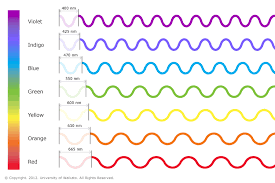
1: The color currents of the circles do not tell much information. should follow a logic from minor to major, one of them is the spectrum of colors visible by the human eye.
Idea
The shorter wavelength is associated with the smaller or newer file (violet color).
The largest wavelength is associated with the largest or oldest file size, (red color).
good idea? or What other ideas do you propose?
Other options are intermediate colors.
https://en.wikipedia.org/wiki/Visible_spectrum
2: When you click on each circle, sort the list according to its characteristic.
1: The color currents of the circles do not tell much information. should follow a logic from minor to major, one of them is the spectrum of colors visible by the human eye.
Idea
The shorter wavelength is associated with the smaller or newer file (violet color).
The largest wavelength is associated with the largest or oldest file size, (red color).
good idea? or What other ideas do you propose?
Other options are intermediate colors.
https://en.wikipedia.org/wiki/Visible_spectrum
2: When you click on each circle, sort the list according to its characteristic.
