[Resolved] 17.90 : No context menu whith Cryptext freeware
Posted: 03 Jun 2017 22:49
Hello,
Under win7 x64
With the file encryption freeware Cryptext
Under xyplorer_full_noinstall-17.90.0400
there is no option in the context menu to encrypt and decrypt files as *.$#!
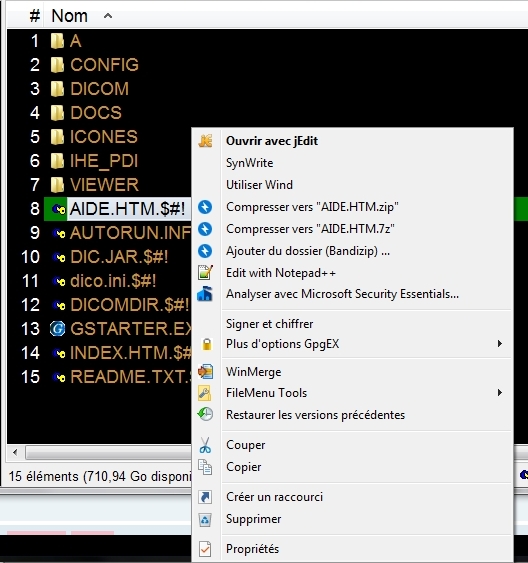
as it is with XYplorerFree-5.55.0002 (where unlike some of them are not)
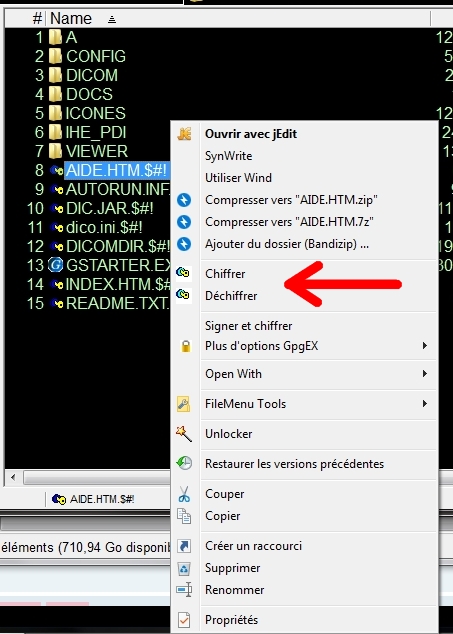
Chiffrer = Encrypt
Déchiffrer = Decrypt
Is it possible to set up context menu option to encrypt and decrypt files as *.$#! with Cryptext ?
Why under XYplorerFree-5.55.0002, but not under xyplorer_full_noinstall-17.90.0400 ?
Specify: the Cryptext encryption context menu options are absent also under windows explorer, they are present under Konvertor explorer freeware.
Thank you for help
Under win7 x64
With the file encryption freeware Cryptext
Under xyplorer_full_noinstall-17.90.0400
there is no option in the context menu to encrypt and decrypt files as *.$#!
as it is with XYplorerFree-5.55.0002 (where unlike some of them are not)
Chiffrer = Encrypt
Déchiffrer = Decrypt
Is it possible to set up context menu option to encrypt and decrypt files as *.$#! with Cryptext ?
Why under XYplorerFree-5.55.0002, but not under xyplorer_full_noinstall-17.90.0400 ?
Specify: the Cryptext encryption context menu options are absent also under windows explorer, they are present under Konvertor explorer freeware.
Thank you for help

