Page 1 of 1
Context of "Search in contents" results?
Posted: 19 Oct 2016 00:18
by bbfyy
Maybe I missed this, but I'd like to:
- Find Files > Contents > plain text string
and have it show the actual line where the string was found -- is that possible? (not the line number, the full line)
So if I search for "dog", the results would show something like
animals.txt "The red dog jumped over the blue cat"
Re: Context of "Search in contents" results?
Posted: 19 Oct 2016 00:59
by highend
Welcome to the forum.
No, this is not possible atm.
Re: Context of "Search in contents" results?
Posted: 19 Oct 2016 10:37
by ds1508
You could do this with a script. But this would not be very effective or fast.
For what do you need this? Search in selected files only, complete directories, witch file types?
Writing a script then should not be that hard.
What do you want to do with the result?
A simple list, selectable, results to a log file?
Re: Context of "Search in contents" results?
Posted: 19 Oct 2016 11:25
by highend
A "scripted" way (you need to execute this
after your search is complete and ofc you need the pro version of XYplorer) could look like this:
Code: Select all
    $results = "";
    foreach($file, <get itemspathnames |>) {
        $query = get("find_contents");
        $content = regexreplace(readfile($file), "\r?\n", <crlf>) . <crlf>;
        $matches = regexmatches($content, "^.*" . $query . ".*?(?=$)", <crlf>);
        $results = $results . quote($file) . ":<crlf>" . $matches . <crlf 2>;
    }
    text "Results:<crlf>========<crlf 2>" . $results;
Be careful it's only written for literal searches, wildcards are not translated into regex expressions...
Re: Context of "Search in contents" results?
Posted: 19 Oct 2016 21:20
by bbfyy
Thanks for the replies.
I use this for finding the correct file when there are lots of results.
So I search for a text string but get a ton of results and if the results show the context then it's much easier to visually scan the results to find the correct file.
Can I assign a button to an external tool that accepts the current folder as a command-line option? I was thinking of using Grepwin (
https://sourceforge.net/projects/grepwin/?source=navbar ) since it does show context for results.
Re: Context of "Search in contents" results?
Posted: 19 Oct 2016 22:54
by highend
Sure you can.
Add a user button to the toolbar like this one:
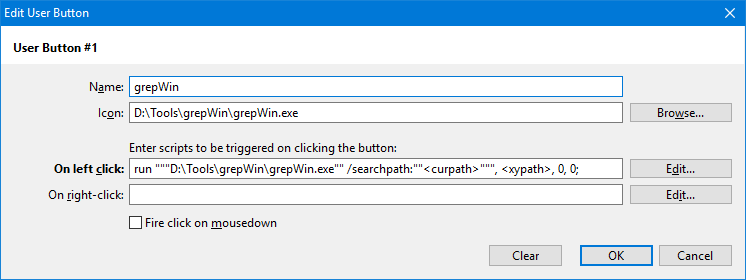
- button.png (8.42 KiB) Viewed 1672 times
This is the code for the left click:
Code: Select all
run """D:\Tools\grepWin\grepWin.exe"" /searchpath:""<curpath>""", <xypath>, 0, 0;
You have to change the path to grepwin (for the icon + the script line) and add additional parameters if you need them...
Re: Context of "Search in contents" results?
Posted: 20 Oct 2016 21:31
by bbfyy
Awesome, thanks!