Page 1 of 1
Crashing after a period of being idle
Posted: 17 Feb 2016 22:20
by steev
Ever since 16.20 it seems I've been getting a weird crashing situation I haven't been able to figure out. I'm currently on 16.20.0300 with the Lifetime License Pro.
I'm not really sure when it happens because I'm not currently using the application at the moment it crashes. I switch to it only to find it has already crashed.
It's running on a Windows 7 Enterprise x64. It's possible there is a conflict with something the IT department has placed on the system but I'm locked out of changing the things they put on the system so I can't removed or isolate anything. Also IT is uncooperative in helping because they consider my use of Xyplorer to be clandestine. :/
I thought maybe that it might be because I often have multiple instances of it open and it's usually the oldest one to crash first. But I've had it crash when I've only been running one.
Anyway, If anyone can offer ideas, things to look at or try, within that limitation, it would help.
Re: Crashing after a period of being idle
Posted: 18 Feb 2016 08:26
by admin
Did you preview PDFs with that instance of XY? This has been reported to lead to "idle crashes" some weeks ago (under certain conditions).
Re: Crashing after a period of being idle
Posted: 18 Feb 2016 14:33
by steev
I don't recall previewing PDFs but I may have clicked on a PDF file. The view window that I always keep open is the "Raw View" so I would have only "previewed" the PDF file in the "Raw View". I'll keep an eye on what files I've clicked on.
Re: Crashing after a period of being idle
Posted: 18 Feb 2016 21:11
by steev
The latest crash I had actually been viewing text and binary files with .dat extensions. All of this was with "Raw View". When I was clicking on the tree view to move between some directories I was looking at these files in, it crashed. There were no .pdf files.
Re: Crashing after a period of being idle
Posted: 19 Feb 2016 09:40
by admin
Can you repeat the crash by doing the same again?
Re: Crashing after a period of being idle
Posted: 19 Feb 2016 21:09
by steev
I haven't been able to reproduce it with the same actions. This is appearing very random. Still working on it.
Re: Crashing after a period of being idle
Posted: 19 Feb 2016 22:00
by admin
Re: Crashing after a period of being idle
Posted: 19 Feb 2016 22:46
by steev
Ok, this is something I can try. So far I've had a window open for several days and the only thing I haven't done is any right clicks on anything to bring up a context menu.
Any other window I had open I've gotten it to crash pretty quickly in some way if I do a right click on a file or in the directory tree. I don't even need to select on item on the context menu. So far I can get a crash on a window if the ONLY thing I do is right click on a file. So, I'm happy about getting closer to the actual cause.
I have the ShellExView program and I can now make changes to the shell items but I would like to show you what my context menu look like for additional context. In the mean time I'm going to keep trying by disabling items. Thanks for this tip.

- contextmenu.png (6.39 KiB) Viewed 1803 times
Re: Crashing after a period of being idle
Posted: 22 Feb 2016 21:12
by steev
I found something!
I hit the "debug" button instead of "close" to see if visual studio could show me any clue of what shell extension I could try to disable first. What I found was unexpected. The DLL in the call stack pointed to an obscure hex editor I used to use that was still on the computer. (HHD Software Free Hex Editor 3.12) It had been on there for years. It's possible that a recent OS patch may have exposed a bug in it that has been causing problems. The odd thing is that it has never shown up in the context menus. I uninstall the editor completely rather than disable it in ShellExView because I never use it. I'm going to continue to watch for crashes.
I'm feeling confident sofar that this may be fixed now.
heshell.dll
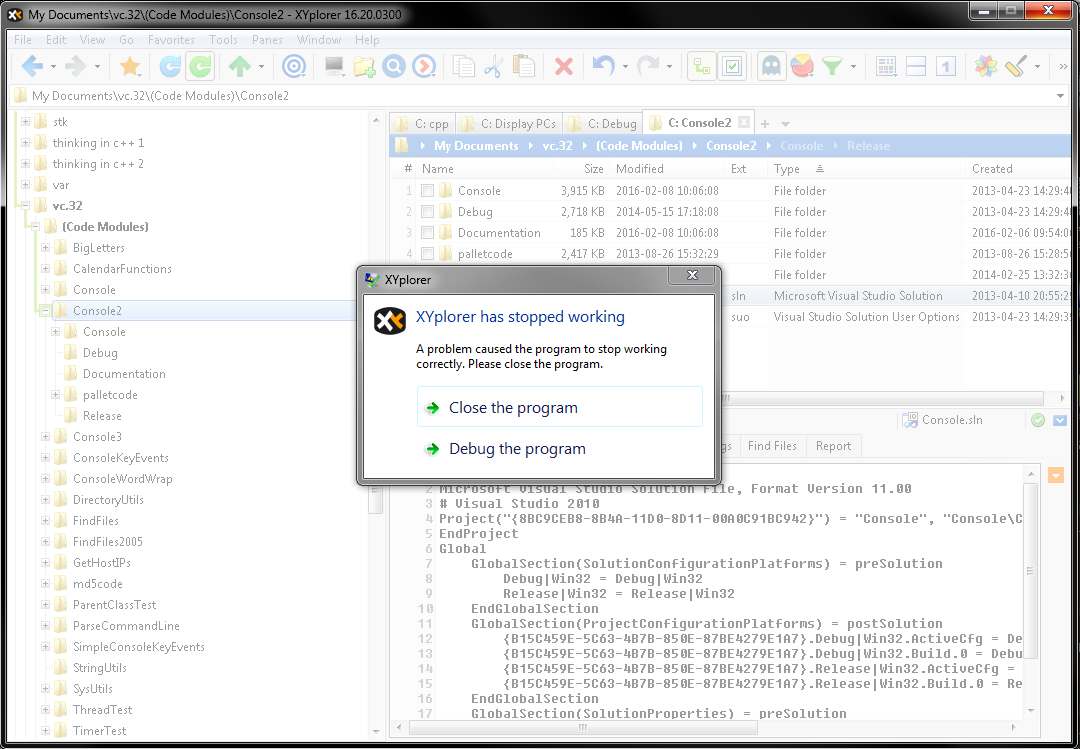
- xy crash.png (104.49 KiB) Viewed 1759 times
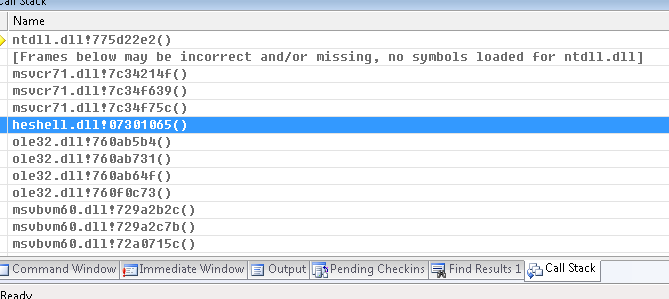
- xy call stack.png (10.29 KiB) Viewed 1759 times
Re: Crashing after a period of being idle
Posted: 23 Feb 2016 09:35
by admin
Gosh!


Thanks for the detective work. Really interesting findings!
Re: Crashing after a period of being idle
Posted: 07 Mar 2016 16:16
by steev
I'm happy report that I've had no crashes after that.

Re: Crashing after a period of being idle
Posted: 07 Mar 2016 16:18
by admin
Yeah!