XYplorer with at 125% or 150% : Shortcat arrow too large
Posted: 30 Mar 2015 11:25
First, thanks for your soft. I find it far better than Microsoft Explorer... A so poor software used each day by hundred of million people...
I used to configure the Windows 7 display option text size to 125% (default is 100%. I havn't tried 150%)
XYplorer works fine at 125% except icon overlay. The arrows of ".lnk" and ".url" files become to large :
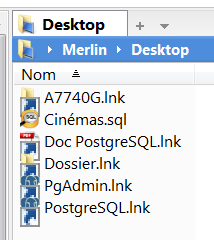
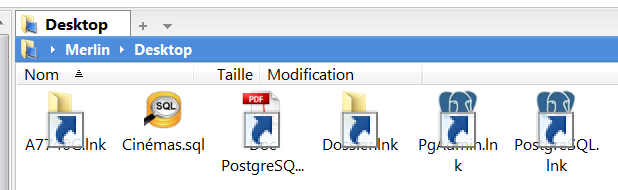
The shortcuts looks bad especialy when displayed at small sizes and it seem's that there is no way to diseable the arrow overlay display.
By th e way, it would be nice if it was possible to diseable the display of ".lnk" and ".url" extensions in shortcuts file names (independantly of the other file name extension).
Sorry for my bad english.
I used to configure the Windows 7 display option text size to 125% (default is 100%. I havn't tried 150%)
XYplorer works fine at 125% except icon overlay. The arrows of ".lnk" and ".url" files become to large :


The shortcuts looks bad especialy when displayed at small sizes and it seem's that there is no way to diseable the arrow overlay display.
By th e way, it would be nice if it was possible to diseable the display of ".lnk" and ".url" extensions in shortcuts file names (independantly of the other file name extension).
Sorry for my bad english.
