Page 1 of 7
Move to recently used tab
Posted: 29 Sep 2006 10:02
by surrender
I have say 4 tabs open "a","b","c" and "d" (in that order). Now i click tab "b" and then go to tab "d" and close it. I am automatically taken to tab "c".
I know that moving to left the is an expected behavior. But would be nice if it takes me to the previous tab "b" i was working with. kind of intuitive to me.
Similarly, it would be nice to have an option to cycle tabs in recently used order.
Posted: 29 Sep 2006 13:21
by zridling
I agree with that. Right now, XYplorer uses the same tab behavior as many browsers do. I know Opera does this, so it's familiar to me. But jumping to the last (far right, that is) tab after closing "D" is not where I want to go every time. Most of the time, it feels natural to go back where I came from.
Posted: 09 Sep 2007 17:30
by serendipity
*BUMP*
Posted: 09 Sep 2007 18:50
by admin
serendipity wrote:*BUMP*
After 1 year, not bad.

Later...


Posted: 07 Nov 2007 21:34
by Pagat
Since i slowly get used to using tabs in a file manager (
) i also miss the option to cycle tabs in recently used order. It would be just perfect for e.g. compare two folders just by clicking CTRL+TAB instead of switching between CTRL+TAB and CTRL+SHIFT+TAB.
Ideally it could be made configurable under "Configuration | Tabs" as seen in Opera:
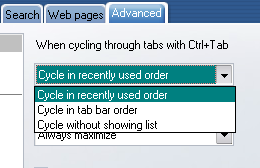
So long...
Pagat
Posted: 08 Nov 2007 08:13
by admin
Pagat wrote:Since i slowly get used to using tabs in a file manager (
) i also miss the option to cycle tabs in recently used order. It would be just perfect for e.g. compare two folders just by clicking CTRL+TAB instead of switching between CTRL+TAB and CTRL+SHIFT+TAB.
I don't get it. If you have more than 2 tabs, how would CTRL+TAB be useful to compare just two folders?
Posted: 08 Nov 2007 08:58
by j_c_hallgren
I wasn't sure either, but just tried one situation that maybe makes a difference: Have 3 tabs, with leftmost being "Search Results"; using CNTL+TAB as is now, I end up on the SR tab, where I don't want to be, so to swap just between the other two, I have to alternate with CNTL+SHIFT+TAB, which is a tad less convenient than just using same keystrokes repeatedly.
Posted: 08 Nov 2007 14:13
by serendipity
I think pagat means just how one would use alt+tab (hold 'alt' and press&release 'tab') to switch between tasks one could use ctrl+tab to switch between recently used tabs.
I think one can have either cycle tabs in recently used order or cycle tabs left to right (for ctrl+tab). Personally I like recently used tab style because especially after closing a tab, XY takes me to a totally unrelated tab which I was never working with in the first place.
Posted: 08 Nov 2007 21:00
by Pagat
admin wrote:I don't get it. If you have more than 2 tabs, how would CTRL+TAB be useful to compare just two folders?
Let's say you have four tabs with folders [A], B, C, D (where [A] is the active one). You want to compare folder A with B.
Situation as it is now (Cycle in tab bar order):
[A] - B - C - D
CTRL-TAB
A -
- C - D
CTRL - TAB
A - B - [C] - D
CTR-TAB
A - B - C - [D]
Cycle in recently used order
[A] - B - C - D
CTRL-TAB
A - - C - D
CTRL - TAB
[A] - B - C - D
CTRL-TAB
A - - C - D
This way you switch back and forth and you can immediately see any difference in the list of files.
(Sometimes i also use this technique comparing two small text files by opening them in Notepad (same window position and window size) and switching between these two windows via ALT-TAB)...
EDIT: I think it would be a little more complicated to implement this, because you would have to mimic "real" ALT-TAB style: While holding CTRL you need to be able to browse through the tabs by repeatedly pressing TAB without activating them to be able to reach folders C and D. (Similiar to CTRL-PGDOWN)
Posted: 08 Nov 2007 21:05
by admin
Pagat wrote:Cycle in recently used order
[A] - B - C - D
CTRL-TAB
A - - C - D
CTRL - TAB
[A] - B - C - D
So C and D were never used??? That's hardly possible (unless maybe if they were created as background tabs and never opened).
BTW, I have a hot tip for you: F7 (= got to previous location)! 
Posted: 08 Nov 2007 21:09
by Pagat
I edited my above post but you were faster...:
EDIT: I think it would be a little more complicated to implement this, because you would have to mimic "real" ALT-TAB style: While holding CTRL you need to be able to browse through the tabs by repeatedly pressing TAB without activating them to be able to reach folders C and D. (Similiar to CTRL-PGDOWN)
Yep, F7 would be a possibility... Let's see if i can work with that
Posted: 08 Nov 2007 21:22
by admin
Pagat wrote:I edited my above post but you were faster...:
EDIT: I think it would be a little more complicated to implement this, because you would have to mimic "real" ALT-TAB style: While holding CTRL you need to be able to browse through the tabs by repeatedly pressing TAB without activating them to be able to reach folders C and D. (Similiar to CTRL-PGDOWN)
Yep, F7 would be a possibility... Let's see if i can work with that
Ah, I got it. I did not realize that you expect that the MRU sequence is updated immediately... but I don't think others would want it that way, because Ctrl+Tab then would always only switch between the last two of the MRU sequence...
Posted: 08 Nov 2007 21:31
by serendipity
admin wrote: but I don't think others would want it that way, because Ctrl+Tab then would always only switch between the last two of the MRU sequence...
I want it that way. Well, as long as you provide two options:
(1) Cycle tabs in recently used order.
(2) Cycle tabs in tab bar order.
In (1) Ctrl+tab will work like how alt+tab works for switching tasks in windows and in (2) Ctrl+tab will work like it does now.
Posted: 09 Nov 2007 03:28
by lukescammell
Ignoring the CTRL+TAB idea (I like it how it is now) I fully support the moving to the last used tab when you close one.
Posted: 09 Nov 2007 09:16
by j_c_hallgren
I suspect that serendipity's idea of two options would satisfy most everyone's ideas of how it best works for them.