Page 3 of 4
Re: Open files in the same order as sorted in XYplorer
Posted: 22 Apr 2016 10:40
by Ruben Keestra
This helps I think
Re: Open files in the same order as sorted in XYplorer
Posted: 22 Apr 2016 10:42
by admin
But this has nothing to do with the problem at hand, since you said you open the files by pressing ENTER (with focus in the list I assume). Or?
Re: Open files in the same order as sorted in XYplorer
Posted: 22 Apr 2016 10:53
by admin
Whatever, I tested it with the Catalog, and it also works as it should.
So, it's a big mystery.
Re: Open files in the same order as sorted in XYplorer
Posted: 22 Apr 2016 10:58
by Ruben Keestra
I'm sorry for the troubles, even my wife think I'm a mystery ;-)
Re: Open files in the same order as sorted in XYplorer
Posted: 22 Apr 2016 11:03
by admin
It might just be a Photoshop bug. (Let your wife know.)
(I just have Photoshop 7.0)
Re: Open files in the same order as sorted in XYplorer
Posted: 22 Apr 2016 11:20
by Ruben Keestra
I'll tell her. She probably knows

Re: Open files in the same order as sorted in XYplorer
Posted: 22 Apr 2016 14:01
by Ruben Keestra
I tried another computer and got the same results. Of course latest version of XYplorer.
Re: Open files in the same order as sorted in XYplorer
Posted: 22 Apr 2016 14:15
by bdeshi
could it be that Photoshop is somehow reprocessing the file list sent to it from XYplorer? (I can confirm that the filelist is sent as sorted)
Re: Open files in the same order as sorted in XYplorer
Posted: 22 Apr 2016 14:51
by admin
SammaySarkar wrote:could it be that Photoshop is somehow reprocessing the file list sent to it from XYplorer? (I can confirm that the filelist is sent as sorted)
I think so too.
@Ruben Keestra: It should be possible to verify that the position of the focus among the selected files has no influence anymore on the opening sequence. If that is verified then XY can shift the blame to Photoshop.
Re: Open files in the same order as sorted in XYplorer
Posted: 22 Apr 2016 15:02
by Ruben Keestra
I tried to open images in Gimp and saw the same behaviour. So probably not a problem of PS.
Re: Open files in the same order as sorted in XYplorer
Posted: 22 Apr 2016 18:03
by admin
Can you verify that the position of the focus among the selected files has no influence anymore on the opening sequence?
Re: Open files in the same order as sorted in XYplorer
Posted: 23 Apr 2016 11:18
by sinilill
I have latest PS and XY and files are opened in sorted list order, no matter where focus is

Re: Open files in the same order as sorted in XYplorer
Posted: 23 Apr 2016 11:42
by Ruben Keestra
I tried a third computer and the same behaviour. All three the same version of PS: CS6. No matter what the focus is.
Re: Open files in the same order as sorted in XYplorer
Posted: 23 Apr 2016 14:10
by admin
Maybe it's some setting in Photoshop, like "Open in sequence of modified date" or so...?
Re: Open files in the same order as sorted in XYplorer
Posted: 23 Apr 2016 16:34
by bdeshi
Photoshop CS6 trial vanilla install (sandboxed)
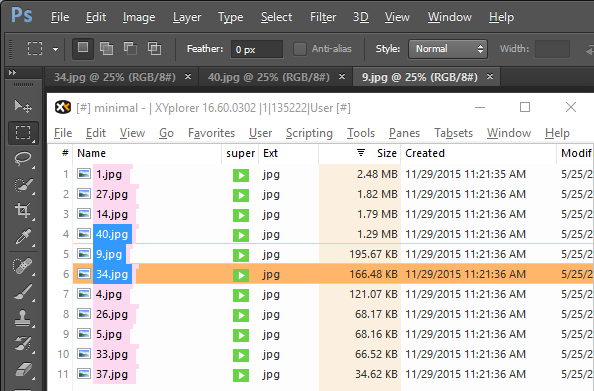
- ps_open_sort.png (45.03 KiB) Viewed 4127 times
34.jpg first by focus, then 40.jpg and 9.jpg in sort order.
edit: opened via drag-drop.