Page 2 of 3
Re: Manual sorting
Posted: 30 Dec 2009 11:54
by David.P
Hi guys,
I have just come across the (for me) sensational information that XYplorer has manual sorting with drag and drop reordering now --- AMAZING!
This is finally at least one starting point for proper document management in a file manager, or the leap from keeping loose piles of papers to the ring binder, if you like.
Unfortunately, it seems that the manual sort order can't be made persistent

Thus, if I'm not mistaken, the Manual Sorting feature still is not much more than what Windows Explorer has been able to do for ages already: temporarily re-order files by drag-and-drop (there at least in symbols and thumbnails view). No one really has used this feature much in Windows Explorer for the simple reason that it is not persistent.
At the contrary, look at FastStone Image Viewer, where the custom sort order IS persistent, which is great. FastStone Image Viewer simply does this by keeping and updating a simple hidden text file inside every folder that contains the files names in their present sequence order.
If anyone else is interested in custom sorting their files (for better document management), have a look at the respective LENGHTY discussion in the
Dopus forum 
For me, a persistent custom sort order would be THE killer feature for any file manager -- that I have been looking for for years already.
Cheers David.P
Re: Manual sorting
Posted: 30 Dec 2009 13:04
by admin
Persistent custom sort order will come together with VFO (Virtual Folders) which are file lists simply drawn from a list/cache (TXT file) instead of from NTFS.
A little problem is what to do when the folder content changes (files are added, removed, renamed...). This is the hard part.
Re: Manual sorting
Posted: 30 Dec 2009 13:19
by David.P
admin wrote:Persistent custom sort order will come together with VFO (Virtual Folders) which are file lists simply drawn from a list/cache (TXT file) instead of from NTFS.

I'm very happy about your announcement and very much looking forward to this new paradigm in file management!
admin wrote:A little problem is what to do when the folder content changes (files are added, removed, renamed...). This is the hard part.
I'd say that new files should always turn up at the top (or bottom, make this configurable). Renamed files of course must stay where they are in my strong opinion. Deleted files -- should disappear

If now you only add flat view, the quick file filter field (or whatever it's called again) and file preview in the second pane (or on the second monitor) I'll be happy and ready to quit Dopus for good in favour of XYplorer.
Thanks and Cheers David.P
Re: Manual sorting
Posted: 30 Dec 2009 13:25
by admin
David.P wrote:admin wrote:Persistent custom sort order will come together with VFO (Virtual Folders) which are file lists simply drawn from a list/cache (TXT file) instead of from NTFS.
I'm very happy about your announcement and very much looking forward to this new paradigm in file management!
admin wrote:A little problem is what to do when the folder content changes (files are added, removed, renamed...). This is the hard part.
I'd say that new files should always turn up at the top (or bottom, make this configurable). Renamed files of course must stay where they are in my strong opinion. Deleted files -- should disappear
If now you only add flat view, the quick file filter field (or whatever it's called again) and file preview in the second pane (or on the second monitor) I'll be happy and ready to quit Dopus for good in favour of XYplorer.
Thanks and Cheers David.P
Haha, I know the song.
If I added everything that everybody liked from his previous file manager I would create a monster for everybody.
However, "file preview in the second pane"... sounds like a cute idea... hm...
Re: Manual sorting
Posted: 30 Dec 2009 16:38
by David.P
admin wrote:
Haha, I know the song.
If I added everything that everybody liked from his previous file manager I would create a monster for everybody.
Heheh... I know what you mean
However since me was the person who humbly requested the "FAYT" Quick File Filter box, as well as the ActiveX Previewer (amongst other things) for Dopus in the first place back in 2003 and 2005, maybe you can make a little exception for someone who's almost been kindofa "co-product manager" for Dopus (once upon a time, back when Dopus development still used to be fast and innovative

)
admin wrote:However, "file preview in the second pane"... sounds like a cute idea... hm...
Yeah I really think there should be a way to either place the
preview pane to the right, to detach and float the preview pane in its own window, or there should be the possibility to "dual-use" the second pane as preview pane. This is especially valid since nowadays almost everyone has widescreen monitors or even dual monitor setups, where a sideways placement of a preview pane makes a lot of sense.
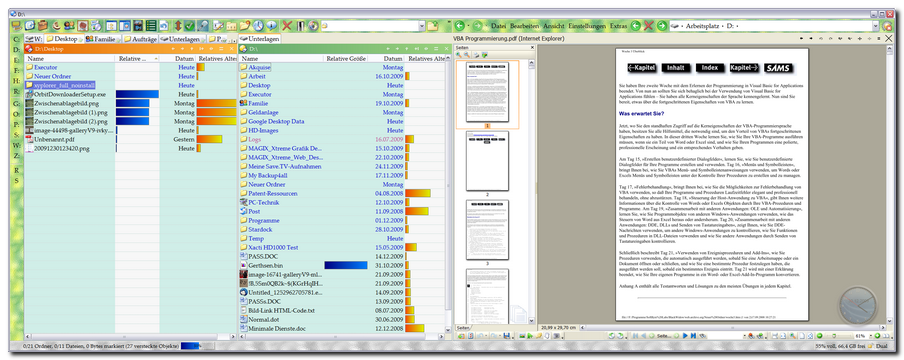
Here's two screenshots of what I mean:
File Management: File lists etc. to the left, preview pane (always open) to the right).
 e-Mail:
 eMail threads list to the left, mail preview pane to the right).
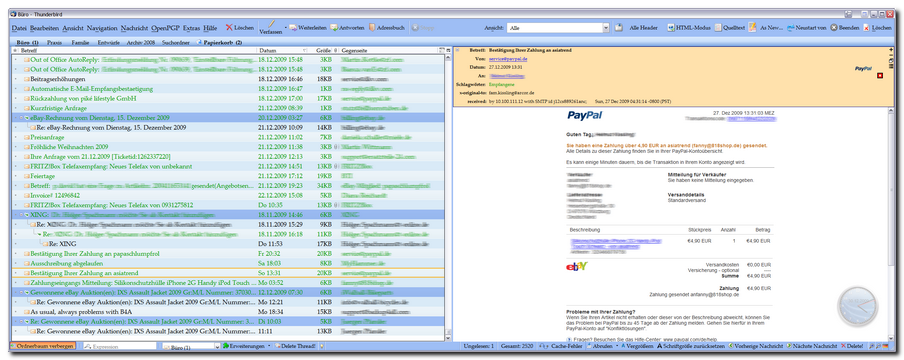
See, I always try to have trees and lists on the left half of the widescreen (i.e. on the left monitor), and the respective preview panes on the right half (i.e. right monitor).
Cheers and keep up the great work --- David.P
Re: Manual sorting
Posted: 31 Dec 2009 00:37
by PeterH
For one situation I see a restriction: on trying to extend a window over 2 screens. I'm afraid here often is the situation of different screen sizes, leading for example to hidden areas of the window on the smaller screen. So for this situation I would request for a second window for the second screen, to size it independent from the first.
Re: Manual sorting
Posted: 31 Dec 2009 02:10
by zer0
admin wrote:However, "file preview in the second pane"... sounds like a cute idea... hm...
Isn't this partially where
Code: Select all
Vertical Preview Panel right of the file list(s)
comes in?

It's in the poll of roadmap suggestions for 2010.
Re: Manual sorting
Posted: 31 Dec 2009 09:53
by admin
zer0 wrote:admin wrote:However, "file preview in the second pane"... sounds like a cute idea... hm...
Isn't this partially where
Code: Select all
Vertical Preview Panel right of the file list(s)
comes in?
It's in the poll of roadmap suggestions for 2010.
Yes, true. I was temporarily carried away by the idea to simply reuse the second pane, but quickly came to the opinion that an additional Vertical Preview Panel is the better solution for a number of reasons.
Re: Manual sorting
Posted: 31 Dec 2009 11:14
by PeterH
If you can tear off the preview it doesn't matter, if from bottom or from right. If you simply move it to the right it often could not be used on a smaller second screen.
Re: Manual sorting
Posted: 31 Dec 2009 16:20
by admin
Back to topic!
I think indeed a custom sort order (made by manual sorting) should be persistent. It's the expected thing for an XYplorer user, a fellow who is used to everything being persistent across tab switches and sessions and whatever. And this should be very true for manual sorting because it can involve quite some dragging and dropping work that just deserves to be retained.
While this (persistent custom sort order) will be a natural part of VFOs, I now think it should also work independently of VFO -- seamlessly and GUI-less: You leave a tab with custom sort order, and when you come back to it, the custom sort order should be restored right as you left it. Same when you close and restart the app.
There is only one use case where I'm still a bit uncertain about how to handle it: You create a custom sort order in a tab, then you change to another folder within the same tab (the sort order will now jump back to the last "normal" sort order), and now you change back to the first folder. Should the last custom sort order be auto-applied now?
My opinion: I don't think so. Rather the current "normal" sort order should persist (unless FVS applies). Instead there should be a way to restore the last custom sort order, a command in the "Sort By" submenu "Restore custom sort order" or so.
Ok?
BTW, to store a custom sort order per tab (as is my plan) will also allow to have different tabs point to the same folder each with a different custom sort order.
Re: Manual sorting
Posted: 31 Dec 2009 16:34
by j_c_hallgren
admin wrote:Should the last custom sort order be auto-applied now?My opinion: I don't think so.
I'm thinking that it should be restored...because I may have simply left the manual sort folder to check on a file/folder (yes, I could/should maybe have used another tab, but say I'm lazy and didn't) and when I return, I'd like to see the MS as I had left it...as you said "
You leave a tab with custom sort order, and when you come back to it, the custom sort order should be restored right as you left it." and I see leaving the MS folder in same tab as similar to leaving the tab.
Re: Manual sorting
Posted: 05 Dec 2013 14:34
by David.P
Hi everyone,
I've lost overview here
I was wondering wheter there was any progress on
persistent manual sorting in the meantime?

In other words, is the
manual sort order only temporary, or will it be saved/restored on returning to the respective folder, and on choosing "manual sort" again?
The Dopus makers hate me for
having requested that feature for seven years, so I thought I'd ask here this time

Regards David.P
Re: Manual sorting
Posted: 05 Dec 2013 14:41
by admin
Hi David.P,
I don't hate you for it, but it looks like you are the only one interested! I have the plans for this feature fully worked out on my table for a long time now, but I won't implement it for just one person. I'm really surprised that not more users, especially photographers and graphic designers, are asking for this, because it really
should interest them, and I found a way to implement this quite tricky feature in a way so that it would work very fast.

Don
Re: Manual sorting
Posted: 05 Dec 2013 14:59
by David.P
Hi Don and thank you for the fast reply,
true, it is strange that no one else seems to be interested in this...
Anyway, I'll keep whatching this space

Thanks and
Cheers David.P
Re: Manual sorting
Posted: 05 Dec 2013 17:38
by TheQwerty
Maybe it's because this thread got bumped, but just now I was looking at the list of drives under Computer and thought...
It's nice that I can manually sort and thus group all these drives, but it does me no good if it cannot be retained.
One look at my list and I have many groups I'd want:
1) Fixed Disks
2) Removable Disks
3) Media Readers (Optical / SD Card)
4) Intranet Mappings
5) Internet Mappings
6) Virtual Mappings
And that's without even considering non-drive devices...
Maybe retaining manual sort isn't the solution to
this problem, besides I'm not really sure how you'd accomplish this for an ever changing collection of removable and network drives anyhow, but it's something to ponder.