Page 2 of 3
Re: Raw view could not display Unicode correctly
Posted: 14 Aug 2009 15:59
by admin
admin wrote:nf_xp wrote:Sorry for the wrong color, they are correct results.
But they look different on my system: no Chinese chars here.
So, if I got you right, the files display correctly the first time but not after you select and unselect some
lines in the raw view? Or you mean select and unselect the files themselves?
Sorry, no need to answer. I think I got it now by myself.
Really reading it helped...

Re: Raw view could not display Unicode correctly
Posted: 14 Aug 2009 16:25
by nf_xp
admin wrote:nf_xp wrote:Sorry for the wrong color, they are correct results.
But they look different on my system: no Chinese chars here.
So, if I got you right, the files display correctly the first time but not after you select and unselect some
lines in the raw view? Or you mean select and unselect the files themselves?
No, they MAY not display correctly the first time (first time select the file after restarted XYplorer), but the first time selecting results (correct or incorrect) of the same file are consistent. I made those results by following the steps in my previous reply:
4. All other selecting orders display correctly (at least the first screen)
I mean select/unselect the files themselves. 1 - 4 are test file names.
Re: Raw view could not display Unicode correctly
Posted: 14 Aug 2009 16:28
by nf_xp

I may write correct English but too slow. Always miss some replies.
Re: Raw view could not display Unicode correctly
Posted: 16 Aug 2009 13:55
by nf_xp
The biggest bug (selecting/deselecting changes the raw view) has been fixed!
But there are still few bugs:
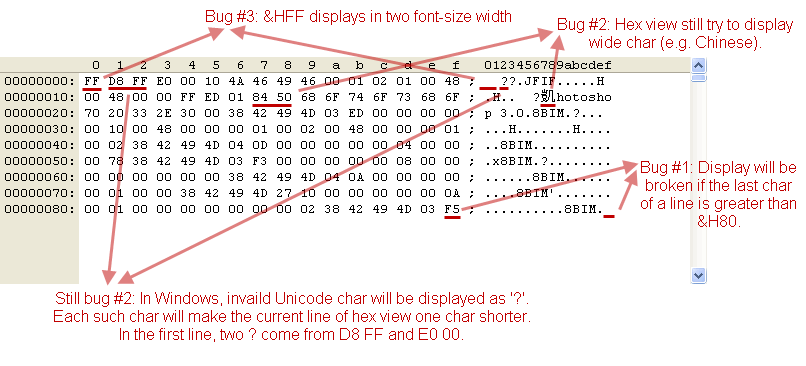
- 2009-8-16 19-12-44.gif (18.25 KiB) Viewed 1962 times
Tested on v8.20.0007.
Re: Raw view could not display Unicode correctly
Posted: 16 Aug 2009 21:54
by admin
nf_xp wrote:The biggest bug (selecting/deselecting changes the raw view) has been fixed!
But there are still few bugs:
2009-8-16 19-12-44.gif
Tested on v8.20.0007.
Thanks for the feedback and the effort! But I have to stop here. Run out of ideas. Maybe, actually surely, inspiration will hit me later...

Re: Raw view could not display Unicode correctly
Posted: 16 Aug 2009 22:18
by PeterH
Sorry: I don't understand the situation.
I'd expect, that for the character-part of the dump each (single) byte of the data is represented by it's character-value, if any.
That is: just replace any non-printable byte of original data by '.', and then print it (as single-byte data).
(OK - with some formatting for 16-byte-parts and such...)
That sounds so very easy?
Or do I understand something wrong?
Re: Raw view could not display Unicode correctly
Posted: 18 Aug 2009 05:42
by nf_xp
Screenshot of v8.20.0010:
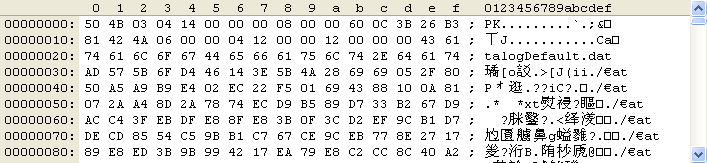
- 2009-8-18 8-45-47.gif (8.96 KiB) Viewed 1909 times
Don, please don't give up, you can fix it
As I tested before, the only way to display extended ASCII chars correctly in wide char system is pass a 16bits char array to DrawText (DrawTextW actually), and the high 8bits of the ith 16bits char is filled with 0 and the low 8bits is copied from the ith byte of raw file data (with some printable char replacement of course).
For DrawTextA and Win9x compatible, no test environment so no best suggestion, but, I think you may add a 'No extended ASCII' option (in the right side with other raw view options) that replaces all extended ASCII chars with dots, just like the way you treat the unprintable chars. I think this option would make the wide char system users happy.
What do you think?
Re: Raw view could not display Unicode correctly
Posted: 18 Aug 2009 08:22
by admin
nf_xp wrote:Screenshot of v8.20.0010:
The attachment 2009-8-18 8-45-47.gif is no longer available
Don, please don't give up, you can fix it
As I tested before, the only way to display extended ASCII chars correctly in wide char system is pass a 16bits char array to DrawText (DrawTextW actually), and the high 8bits of the ith 16bits char is filled with 0 and the low 8bits is copied from the ith byte of raw file data (with some printable char replacement of course).
For DrawTextA and Win9x compatible, no test environment so no best suggestion, but, I think you may add a 'No extended ASCII' option (in the right side with other raw view options) that replaces all extended ASCII chars with dots, just like the way you treat the unprintable chars. I think this option would make the wide char system users happy.
What do you think?
I would do it if it was not for the "PNG" results you gave me. The first character is ‰ (ASCII 137, 0x89, resolved to the extended char U+2030!). If I zero all high bits then this character would not be shown (at least not on my system) -- but all Hex Viewers I've seen (including yours!) do show this character as the first of PNG files.
With extended chars (as it should be I think):
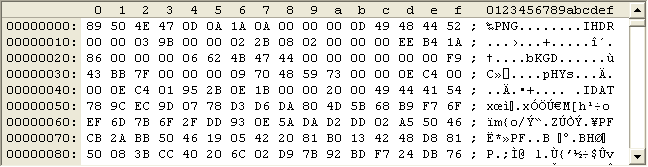
- PNG-hex-extended-chars.png (7.17 KiB) Viewed 1894 times
Without extended chars:
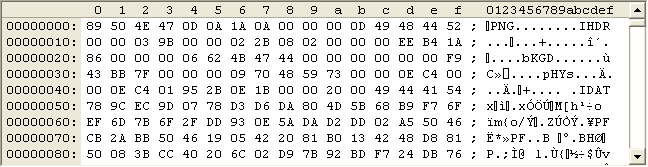
- PNG-hex-no-extended-chars.png (7.22 KiB) Viewed 1895 times
Re: Raw view could not display Unicode correctly
Posted: 18 Aug 2009 14:53
by nf_xp
The first character is ‰ (ASCII 137, 0x89, resolved to the extended char U+2030!).
Interesting... Tested some code pages, none of them can do such a converting.
How about this: Manually create a map array for the 256 single byte chars, map them to their wide chars. I bet it's even faster than some APIs, and only take 2 x 256 = 512 bytes space.
Just need to test out which wide chars should be mapped to. And there is one: WBCMap(137) = U+2030

Re: Raw view could not display Unicode correctly
Posted: 18 Aug 2009 15:11
by admin
nf_xp wrote:The first character is ‰ (ASCII 137, 0x89, resolved to the extended char U+2030!).
Interesting... Tested some code pages, none of them can do such a converting.
How about this: Manually create a map array for the 256 single byte chars, map them to their wide chars. I bet it's even faster than some APIs, and only take 2 x 256 = 512 bytes space.
Just need to test out which wide chars should be mapped to. And there is one: WBCMap(137) = U+2030
Yes, that should work. I just wonder why I never heard of this problem. I find it hard to believe that other apps go such a way for a simple drawtext job...
The other question is which chars to map. I cannot test here which wide chars are ok and which are not since over here they are all ok, and I definitely want to keep my wide chars alive over here.
Now if you create a table for me with chars (ASCII values) that don't work in China, this table will probably not be very useful in Japan. This does not lead anywhere...

Please send a screen shot of the beginning of a PNG file in a Hex Editor that works 100% ok in China.
Re: Raw view could not display Unicode correctly
Posted: 18 Aug 2009 19:17
by nf_xp
Finally got it works! In C++:
Code: Select all
_locale_t loc = _create_locale(LC_ALL, "enu"); // the only secret
size_t n;
_mbstowcs_s_l(&n, szText, 1024, szTextA, _TRUNCATE, loc); // szText[1024]
_free_locale(loc);
You can check out _mbstowcs_s_l, _create_locale and _free_locale in MSDN.
Test data and screenshot:
The source string szTextA is a 129 bytes array from 0x80 to 0xFF, plus a terminated 0. The attachment is the converted wide string.
Re: Raw view could not display Unicode correctly
Posted: 19 Aug 2009 07:55
by admin
nf_xp wrote:Finally got it works! In C++:
Code: Select all
_locale_t loc = _create_locale(LC_ALL, "enu"); // the only secret
size_t n;
_mbstowcs_s_l(&n, szText, 1024, szTextA, _TRUNCATE, loc); // szText[1024]
_free_locale(loc);
You can check out _mbstowcs_s_l, _create_locale and _free_locale in MSDN.
Test data and screenshot:
The source string szTextA is a 129 bytes array from 0x80 to 0xFF, plus a terminated 0. The attachment is the converted wide string.
Thanks, I never heard of these functions. Why "enu"?
I will try something with MultiByteToWideCharPtr and CP_ACP...
Re: Raw view could not display Unicode correctly
Posted: 19 Aug 2009 10:17
by nf_xp
MultiByteToWideCharPtr and CP_XXX wouldn't work, that was my first try.
"enu" is the language string for English (United States).
Re: Raw view could not display Unicode correctly
Posted: 19 Aug 2009 10:39
by admin
nf_xp wrote:MultiByteToWideCharPtr and CP_XXX wouldn't work, that was my first try.
"enu" is the language string for English (United States).
Bad.
But creating a fake locale sounds like a heavy process. My function has to be very fast.
Re: Raw view could not display Unicode correctly
Posted: 19 Aug 2009 11:00
by admin
admin wrote:nf_xp wrote:MultiByteToWideCharPtr and CP_XXX wouldn't work, that was my first try.
"enu" is the language string for English (United States).
Bad.
But creating a fake locale sounds like a heavy process. My function has to be very fast.
PS: Did you try CP_WINDOWS1252? See
http://en.wikipedia.org/wiki/Windows-1252