Page 2 of 2
Re: XYcopy doesn't detect correct available space on mountpoints
Posted: 24 Sep 2025 06:18
by 1024mb
This is what it's printed (I redacted the SID for precaution):
Code: Select all
XYplorer 27.10.0900  -  Windows 10 (Unknown Product Type: 191), 64-bit, Version 21H2, Build 19044.6332 (10.0)  -  2025-09-23 23:11:54

Path: A:\drive_1
Real Path: A:\drive_1

ExistFile: False
ExistPath: True
ExistFolder: True
ExistItemFF: True
ExistPathFF: True
ExistPathOrFile: True
ExistPathOrFileShell: True
ExistDrive: True

Shell DisplayName: drive_1
Shell TypeName: Carpeta de archivos
Opens with: XYplorer [C:\Programs\XYplorer\XYplorer.exe]

Shell Icon: 3
Resolved Icon: 3
Custom File Icon: 3 (enabled)

HasFolderContents: True

IsNetworkLocation: True
GetDriveType: 4 (DRIVE_REMOTE)
GetItemType: 2
GetFileAttributes: 0x10 (16) - D
Owner: S-1-5-21-XXXXXXXXXX-XXXXXXXXXX-XXXXXXXXX-XXXX
IsDriveHidden: False/False, ShowHiddenDrives: 1, HideDrivesByLetter: DEF
Watchable: True
Mapped: \\192.168.18.16\zfs_datasets_alt

LockedTree: 0, MiniTree: 1, MiniTreeVerifyOnSelect: 0, TreeSkipVerifyOnSelect: 0
FilenamesCaseSensitive: 0, Portable Devices Count: 0

NetworkEnumeration: 1, AssumeServersExist: 1, PrecheckServers: 0, CacheServers: 1
CheckServerMethod: 0, CheckServer3: 0, NetworkCapsCheck: 0, ShowAllServers: 1, ShowHiddenShares: 1
Re: XYcopy doesn't detect correct available space on mountpoints
Posted: 24 Sep 2025 11:40
by bossi
dunno whats the issue , but doing a
on a moutpoint returns correct data of the physical ssd
Re: XYcopy doesn't detect correct available space on mountpoints
Posted: 24 Sep 2025 14:44
by admin
1024mb wrote: ↑24 Sep 2025 06:18
This is what it's printed (I redacted the SID for precaution):
...
1) So we are not talking about mountpoints at all but about mapped drives.
2) Does this return the correct free space for
A:\drive_1?:
get("freespace", "\\192.168.18.16\zfs_datasets_alt");
Re: XYcopy doesn't detect correct available space on mountpoints
Posted: 24 Sep 2025 17:25
by 1024mb
1. Yes, from Windows these are mounted network shares, from the server they are mountpoints. On the server Drive1 and Drive2 have been mounted on their particular directory inside /mnt/zfs_datasets_alt, and then that zfs_datasets_alt folder has been shared through SMB.
From the server-side the zfs_datasets_alt directory is located in the main drive (which has 60GB of free space), and drive_1 & drive_2 subdirectories point to drive 1 and 2 respectively.
In Windows the mounted zfs_datasets_alt share (mounted on letter A) is reporting 60GB free in the root of A but any of the two subdirectories also report the same instead of reporting the correct available space per drive.
2. get("freespace", "\\192.168.18.16\zfs_datasets_alt"); returns 60GB, the correct free space for zfs_datasets_alt (which is the free space of the main drive in the server).
get("freespace", "\\192.168.18.16\zfs_datasets_alt\drive_1"); and get("freespace", "\\192.168.18.16\zfs_datasets_alt\drive_2"); both return the same wrong 60GB.
Running dir against all these UNC paths does prints the correct available space for each one.
Re: XYcopy doesn't detect correct available space on mountpoints
Posted: 24 Sep 2025 18:07
by admin
What do you get from exist "\\192.168.18.16\zfs_datasets_alt\drive_1";?
Re: XYcopy doesn't detect correct available space on mountpoints
Posted: 24 Sep 2025 18:12
by 1024mb
Code: Select all
XYplorer 27.10.0900  -  Windows 10 (Unknown Product Type: 191), 64-bit, Version 21H2, Build 19044.6332 (10.0)  -  2025-09-24 11:10:21

Path: \\192.168.18.16\zfs_datasets_alt\drive_1
Real Path: \\192.168.18.16\zfs_datasets_alt\drive_1

ExistFile: False
ExistPath: True
ExistFolder: True
ExistItemFF: True
ExistPathFF: True
ExistPathOrFile: True
ExistPathOrFileShell: True
ExistDrive: True

Shell DisplayName: drive_1
Shell TypeName: Carpeta de archivos
Opens with: XYplorer [C:\Programs\XYplorer\XYplorer.exe]

Shell Icon: 3
Resolved Icon: 3
Custom File Icon: 3 (enabled)

HasFolderContents: True

IsNetworkLocation: True
GetDriveType: 0 (DRIVE_UNKNOWN)
GetItemType: 2
GetFileAttributes: 0x10 (16) - D
Owner: S-1-5-21-XXXXXXXXXX-XXXXXXXXXX-XXXXXXXXX-XXXX
IsDriveHidden: False/False, ShowHiddenDrives: 1, HideDrivesByLetter: DEF
Watchable: True

LockedTree: 0, MiniTree: 1, MiniTreeVerifyOnSelect: 0, TreeSkipVerifyOnSelect: 0
FilenamesCaseSensitive: 0, Portable Devices Count: 0

NetworkEnumeration: 1, AssumeServersExist: 1, PrecheckServers: 0, CacheServers: 1
CheckServerMethod: 0, CheckServer3: 0, NetworkCapsCheck: 0, ShowAllServers: 1, ShowHiddenShares: 1

ExistItemUNC: True
ExistPathUNC: True
ExistPathUNCQuick: True

ExistServer: True -  AccessDenied: False - BadNetPath: False - AccessErrorCode: 0
IsShareAccessDenied: True - AccessErrorCode: 53
IsOnKnownServer: True
IsServerConnected: False - Return/BufferType: 53/0
Re: XYcopy doesn't detect correct available space on mountpoints
Posted: 29 Sep 2025 14:10
by admin
I stared at it for several days but cannot explain it.

Re: XYcopy doesn't detect correct available space on mountpoints
Posted: 30 Sep 2025 16:06
by admin
I saw something now. Might work better in the next beta.
Re: XYcopy doesn't detect correct available space on mountpoints
Posted: 14 Oct 2025 20:19
by 1024mb
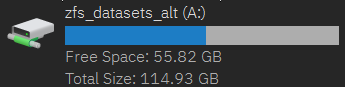
I just tried latest beta but things haven't changed, XYplorer is still reporting the server's root drive disk space.
The drive letter itself is reporting this too:
- XYplorer_2025-10-14_13-16-34.png (3.84 KiB) Viewed 7487 times
Re: XYcopy doesn't detect correct available space on mountpoints
Posted: 25 Oct 2025 18:46
by admin
Works fine here. Can't see what else to fix.