Page 2 of 2
Re: mark searchable PDF files
Posted: 04 Mar 2021 17:59
by highend
on "Drive Snapshot - Tips und Tricks.pdf":
Restoring (or migration) a virtual maschine
VMWare/MS Virtual Server
more tips
The conventional method
Just boot the virtual machine, using a DOS or BartPE Bootdisk.
Restore the machine like a 'normal' one, probably using the network.
A better way to do it
Create a new (virtual) disk, using the supplied virtual machine tools. There's no need to partition it (yet).
Next, you mount the virtual disk into your host system as a virtual disk.
Microsoft Virtual Server 2005 R2 Service Pack 1 has a command line tool VHDMount, which allows to
mount a .VHD as virtual drive.
...
-> Your iFilter installation on your system is broken...
Re: mark searchable PDF files
Posted: 04 Mar 2021 22:50
by Horst
highend wrote: ↑04 Mar 2021 17:59
on "Drive Snapshot - Tips und Tricks.pdf":
Restoring (or migration) a virtual maschine
VMWare/MS Virtual Server
more tips
The conventional method
Just boot the virtual machine, using a DOS or BartPE Bootdisk.
Restore the machine like a 'normal' one, probably using the network.
A better way to do it
Create a new (virtual) disk, using the supplied virtual machine tools. There's no need to partition it (yet).
Next, you mount the virtual disk into your host system as a virtual disk.
Microsoft Virtual Server 2005 R2 Service Pack 1 has a command line tool VHDMount, which allows to
mount a .VHD as virtual drive.
...
-> Your iFilter installation on your system is broken...
But Windows indexing is using it and successfully finds and indexes text in hundret of files.
Also I can change the iFilter used on the fly and the results are the same.
Re: mark searchable PDF files
Posted: 05 Mar 2021 09:22
by Horst
highend wrote: ↑04 Mar 2021 17:59
on "Drive Snapshot - Tips und Tricks.pdf":
Restoring (or migration) a virtual maschine
VMWare/MS Virtual Server
more tips
The conventional method
Just boot the virtual machine, using a DOS or BartPE Bootdisk.
Restore the machine like a 'normal' one, probably using the network.
A better way to do it
Create a new (virtual) disk, using the supplied virtual machine tools. There's no need to partition it (yet).
Next, you mount the virtual disk into your host system as a virtual disk.
Microsoft Virtual Server 2005 R2 Service Pack 1 has a command line tool VHDMount, which allows to
mount a .VHD as virtual drive.
...
-> Your iFilter installation on your system is broken...
Ok, now using Tracker PDFEdit iFilter and it works with the new code.
But its terrible slow.
Using the script with PDF tools takes 18 seconds to scan 220 files,
the new internal method needs 58 seconds for the same job.
So I will stay with the old script.
Re: mark searchable PDF files
Posted: 05 Mar 2021 13:36
by mgroen
I dont know what the heck you guys are talking about!
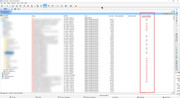
To make it more clear what I need, I made a screenshot.
It's based on FreeCommander (another file manager), but the idea is the same.
In short again: I need a filemanager who can mark/display if PDF file is searchable or not
Re: mark searchable PDF files
Posted: 05 Mar 2021 13:55
by highend
You have a working PDF iFilter on your system: XY can do it itself.
You have not, XY can only do it with the help of xpdf.
Don't know where the problem is...
Re: mark searchable PDF files
Posted: 05 Mar 2021 13:56
by RalphM
I need a filemanager who can mark/display if PDF file is searchable or not
Which is exactly what they are trying to achieve for you and it would probably help if you tested the presented solutions so far in order to give some feedback.
Re: mark searchable PDF files
Posted: 05 Mar 2021 14:11
by Horst
mgroen wrote: ↑05 Mar 2021 13:36
I dont know what the heck you guys are talking about!
To make it more clear what I need, I made a screenshot.
It's based on FreeCommander (another file manager), but the idea is the same.
In short again: I need a filemanager who can mark/display if PDF file is searchable or not
This is exactly what the solutions above can provide.
Make a custom column which displays the result provided from one of the scripts.
It looks like you don't read the provided solutions and never tried anything from it.
So its almost useless trying to help you

Re: mark searchable PDF files
Posted: 05 Mar 2021 14:46
by mgroen
Horst wrote: ↑05 Mar 2021 14:11
mgroen wrote: ↑05 Mar 2021 13:36
I dont know what the heck you guys are talking about!
To make it more clear what I need, I made a screenshot.
It's based on FreeCommander (another file manager), but the idea is the same.
In short again: I need a filemanager who can mark/display if PDF file is searchable or not
This is exactly what the solutions above can provide.
Make a custom column which displays the result provided from one of the scripts.
It looks like you don't read the provided solutions and never tried anything from it.
So its almost useless trying to help you
What the hell has a VMWARE/MS Virtual Server has to do with the overview I need?!
I need a tool to provide the overview as requested. Not a virtual machine server
Re: mark searchable PDF files
Posted: 05 Mar 2021 14:52
by highend
Are you drunk?
Re: mark searchable PDF files
Posted: 05 Mar 2021 15:08
by mgroen
highend wrote: ↑05 Mar 2021 14:52
Are you drunk?
Seriously, please stay to the point:
My objective is to get an overview in a decent filemanager. Not going to spend ages on writing scripts, vmware instructions what of bullshit.
If xyplorer doesnt provide this in an easy way, fine, just say so.
Dont provide all these vmware /server shit
Re: mark searchable PDF files
Posted: 05 Mar 2021 15:13
by highend
*baffled*
Two solutions were given, closing this thread now (I don't want to read more of that bullshit)...