Page 2 of 3
Re: error on script moveto
Posted: 08 Nov 2020 09:03
by swan_x
strange behavior: i have saved this script to filename.xys and run it through keyboards (L key)
all work correctly but at the end my script is self-eliminated and it's not in the trash... why?
i have other script.xys and run with L key without this problem...
Re: error on script moveto
Posted: 08 Nov 2020 09:06
by highend
Obviously one of your delete commands removed it?
Re: error on script moveto
Posted: 08 Nov 2020 09:53
by swan_x
this is my final script:
Code: Select all
setting "BackgroundFileOps", 0; delete 0,0, "D:\folder\*.*"; moveto "D:\.......folder", "C:\folder......\*"; delete 0, 0, "D:\folder\file.wav|D:\folder\file.dat|D:\folder\file.msg|D:\folder\file.exe"; delete 0, 0, formatlist(listfolder("D:\folder....\qm\", , 1), "F", , "!qt_en.qm|file.en.qm", "f"); delete 0,0, "C:\folder\"; moveto "D:\folder", "D:\folder\file.exe", , , 2, 2;
my script.xys it's not named in my script....
Re: error on script moveto
Posted: 08 Nov 2020 10:01
by highend
my script.xys it's not named in my script....
Yeah, and? You are moving files, you are deleting files (by wildcard and all with some exclusions) and you don't come to the conclusion that you should check which of your single statements is responsible for either moving or deleting your script?
Re: error on script moveto
Posted: 08 Nov 2020 10:05
by swan_x
---
Re: error on script moveto
Posted: 08 Nov 2020 15:12
by swan_x
yes, my script have multiple commands. anyway i don't understand why if run script from keyboard this is deleted after all commands...
is there a way for this not to happen?
Re: error on script moveto
Posted: 08 Nov 2020 15:21
by highend
Store it in <xyscripts>?
Re: error on script moveto
Posted: 08 Nov 2020 18:58
by swan_x
thank you for your suggestion.
or (other way) burn a rule to run from user - manage commands - run script ...
Re: error on script moveto
Posted: 08 Nov 2020 19:27
by swan_x
store on <xyscripts> same behavior: file .xys is deleted after use.
work if run script trough manage commands - run script (only valid way)
Re: error on script moveto
Posted: 09 Nov 2020 14:37
by swan_x
I don't understand the correlation between the various commands inserted into the script and the fact that the script self-deletes itself at the end of the commands ... (with run .xys file trough L key)
Re: error on script moveto
Posted: 09 Nov 2020 14:43
by highend
Post the full content of the final script with REAL folders + file names
Post the full path + file name of your .xys file
Post whatever you're invoking with the ominous "L" key (+ screenshot!)
If you are not able to do all of the above: Solve your problem yourself...
Re: error on script moveto
Posted: 09 Nov 2020 19:00
by swan_x
this is my final script:
Code: Select all
setting "BackgroundFileOps", 0; delete 0,0, "D:\000\tmp\spify_downloader\yosbu_down\App\YouMP3\*.*"; moveto "D:\000\tmp\spify_downloader\yosbu_down\App\YouMP3", "C:\Sandbox\KGD56GE\KGD56GE\drive\C\Program Files\Mediaman\YouConvert\*"; delete 0, 0, "D:\000\tmp\spify_downloader\yosbu_down\App\YouMP3\ring.wav|D:\000\tmp\spify_downloader\yosbu_down\App\YouMP3\unins000.dat|D:\000\tmp\spify_downloader\yosbu_down\App\YouMP3\unins000.msg|D:\000\tmp\spify_downloader\yosbu_down\App\YouMP3\unins000.exe"; delete 0, 0, formatlist(listfolder("D:\000\tmp\spify_downloader\yosbu_down\App\YouMP3\qm\", , 1), "F", , "!qt_en.qm|YouTubeToMP3.en.qm", "f"); delete 0,0, "C:\Sandbox\KGD56GE\KGD56GE\"; moveto "D:\000\tmp\spify_downloader\yosbu_down\App\YouMP3", "D:\000\YouPP3.exe", , , 2, 2;
filename: script_xy_YouPP3.xys
file path: D:\000\tmp\spofy_downloader or other folder, no change. also on
<xyscripts> same behavior... script self-deletes itself at the end...
from XY on Scripting menu - Load Selected Script File i have assigned L key
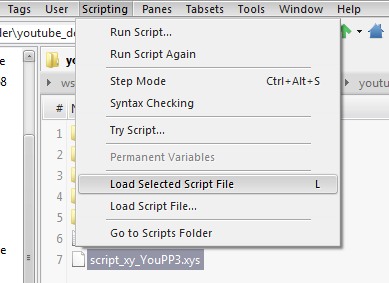
Re: error on script moveto
Posted: 09 Nov 2020 19:16
by highend
I doubt that one of the commands in the script file leads to self-deletion but test it.
Open a second XY instance.
Switch back to the first.
Add a step; as the second command in your script.
Select the script in the first instance and run it from there.
Let it execute one command after another and after one was executed, switch to the second instance and check if the script file still exists.
Do that until you've executed all commands in the script...
Re: error on script moveto
Posted: 10 Nov 2020 09:45
by swan_x
clear. I just didn't understand where to add
step;
like this ??
Code: Select all
setting "BackgroundFileOps", 0; delete 0,0, "D:\.........\*.*"; step; moveto "D:\.......", "C:\.........\*";
Re: error on script moveto
Posted: 10 Nov 2020 09:53
by highend
Before the first delete command, not after.