Re: Paste into Multiple Folders ?
Posted: 17 Feb 2022 05:57
Today I had to again use "copy to many" script.
Please note (and this seems to be important) that I tested the whole procedure on Windows 7 Pro setup.
First I created a test folder, copied that 30 times, and created a dummy text file.
Then I followed the advice from the previous post:
Again, in the lower right I got the stripped white-and-blue "Non-completed Background Jobs" icon turning.
However, at this point I right-clicked on the white-and-blue stripey icon, context menu popped up, and one of the options was [checked] Enable Background Processing.
So I unchecked it and retried to copy one (1) dummy file into thirty (30) test folders -- and it worked this time without a hiccup!
For Some Reason The Image Is Not Fetched, So Just Click Here
===
After that successful run I decided to test this on another computer, starting from fresh install of XYPlorer.
This time, however, the script worked as promised even before I unchecked the Enable Background Processing option.
The main difference here is the version of OS -- on the second PC I have Windows 10 ver 21H2.
So... to make the long story short, it seems that your experience with this script may vary based on the OS it's running on.
Please note (and this seems to be important) that I tested the whole procedure on Windows 7 Pro setup.
First I created a test folder, copied that 30 times, and created a dummy text file.
Then I followed the advice from the previous post:
Unfortunately that did not make any difference in my case -- just as before the script went through making 14 successful copies before choking.
Again, in the lower right I got the stripped white-and-blue "Non-completed Background Jobs" icon turning.
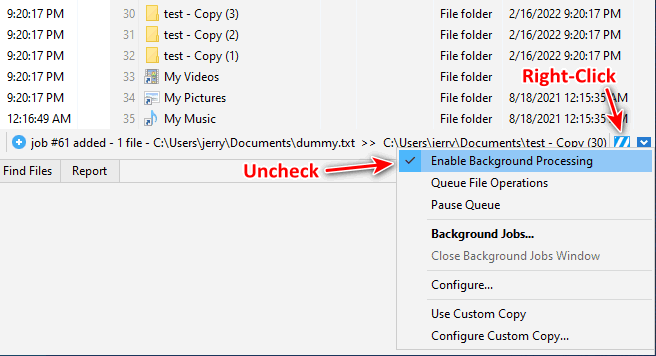
However, at this point I right-clicked on the white-and-blue stripey icon, context menu popped up, and one of the options was [checked] Enable Background Processing.
So I unchecked it and retried to copy one (1) dummy file into thirty (30) test folders -- and it worked this time without a hiccup!
For Some Reason The Image Is Not Fetched, So Just Click Here
===
After that successful run I decided to test this on another computer, starting from fresh install of XYPlorer.
This time, however, the script worked as promised even before I unchecked the Enable Background Processing option.
The main difference here is the version of OS -- on the second PC I have Windows 10 ver 21H2.
So... to make the long story short, it seems that your experience with this script may vary based on the OS it's running on.