Page 9 of 12
Re: HoverBox improvements
Posted: 06 Oct 2018 07:18
by Borut
Don, your move is in the direction I wanted to suggest. The rest of my suggestion would be:
Adapt the positioning logic of both HBOF (=hover box over folder) and MDSU in such a way that the real list parts of both (i.e. when footer area part of HBOF is not considered) are positioned exactly at the same pixel. In my view this would be very cool.
And after the Phase 2 (Scrolling) and Phase 3 (folder to folder traversal in MDSU) are once completed, it will finally be there: The first file explorer using Wormholes for file space exploration.


Re: HoverBox improvements
Posted: 06 Oct 2018 09:31
by admin
The position of the Hover Box is so that you see the captions of the hovered and of the neighboring items (if possible within the screen). I think I want to keep it like that.
Re: HoverBox improvements
Posted: 06 Oct 2018 12:32
by admin
Borut wrote:And after the Phase 2 (Scrolling) and Phase 3 (folder to folder traversal in MDSU) are once completed, it will finally be there: The first file explorer using Wormholes for file space exploration.
I'll keep that in mind for promotion...
Re: HoverBox improvements
Posted: 06 Oct 2018 13:38
by Filehero
Improvements are
Re: HoverBox improvements
Posted: 06 Oct 2018 20:43
by klownboy
I'm liking the Polaroid look for Hover Box images. It seems to make the images standout - much more so than the dark frame.
Re: HoverBox improvements
Posted: 08 Oct 2018 19:21
by Leito
In a multi-screen environment, could you make it so that the whole HoverBox stays on the screen where the XYplorer window is? Currently the HoverBox steps over the other screen.
Re: HoverBox improvements
Posted: 08 Oct 2018 22:55
by CompSystems
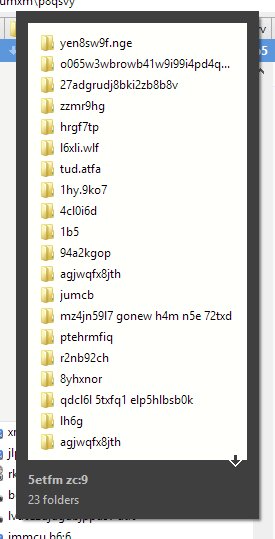
Is this image displayed when the mouse pointer is placed in the name of a folder that contains subfolders?
Re: HoverBox improvements
Posted: 08 Oct 2018 23:04
by Leito
CompSystems wrote:Is this image displayed when the mouse pointer is placed in the name of a folder that contains subfolders?
Yes, called "Hover Box".
Re: HoverBox improvements
Posted: 09 Oct 2018 10:28
by admin
Leito wrote:In a multi-screen environment, could you make it so that the whole HoverBox stays on the screen where the XYplorer window is? Currently the HoverBox steps over the other screen.
Alright.
Re: HoverBox improvements
Posted: 09 Oct 2018 15:40
by Leito
Code: Select all
v19.20.0018 - 2018-10-09 14:30
    * Hover Box: In a multi-screen environment the whole HoverBox now stays on
      the screen where the XYplorer window is. Before it would sometimes step
      over the other screen.
Thanks for this.

I think there's a bug though : I have screen #2 set to the left of screen #1 (which is the main screen) :
Code: Select all
Screen: 1920x1080, 2/2 (Secondary), Virtual: (-1920, 0) - (3840, 1080), Work: (0, 0) - (1920, 1040)
If XYplorer starts directly on screen #2, the HoverBox is now wrongly displayed entirely on screen #1. After moving the XYplorer window, the HoverBox is correctly and entirely displayed on screen #2.
Re: HoverBox improvements
Posted: 09 Oct 2018 17:53
by admin
OK, next version should fix this.
Re: HoverBox improvements
Posted: 10 Oct 2018 03:08
by CompSystems
Leito wrote:CompSystems wrote:Is this image displayed when the mouse pointer is placed in the name of a folder that contains subfolders?
Yes, called "Hover Box".
It only works for files, for folders I have to do some configuration?
Re: HoverBox improvements
Posted: 10 Oct 2018 03:40
by jupe
Configuration | Information | File Info Tips | Show Hover Box | Select Item Types...
Re: HoverBox improvements
Posted: 10 Oct 2018 07:46
by Leito
Code: Select all
v19.20.0019 - 2018-10-09 23:49
    ! Hover Box: Wrong initial placement of box since v19.20.0018. Fixed.
Thanks. All seems good now.

Re: HoverBox improvements
Posted: 11 Oct 2018 22:43
by CompSystems
jupe wrote:Configuration | Information | File Info Tips | Show Hover Box | Select Item Types...
ok folder appears, although, should say "Folders and files"
Ideas:
1: better two options only one to display folders and other folders and files
Configuration | Information | File Info Tips | Show Hover Box | Select Item Types... folders
Configuration | Information | File Info Tips | Show Hover Box | Select Item Types... folders and files
2: the icon that symbolizes the folders, should also be double, that is, an icon that only represents folders if the content contains only folders and a special icon that shows if it contains both folders and files