Page 9 of 11
Re: Preview 2.0 - Generic Thread
Posted: 01 Mar 2016 22:00
by TheQwerty
admin wrote:It looks different here, no lines at all. No time right now to check the conditions of your look.
FYI that last image was from fresh with just FlatLook set to 1. No other settings were changed in XY.
EDIT: The key to improvement is this:
TabFlatBack=1
Re: Preview 2.0 - Generic Thread
Posted: 01 Mar 2016 22:09
by Filehero
Heya,
finally it's me who steps in - as always several parties too late.

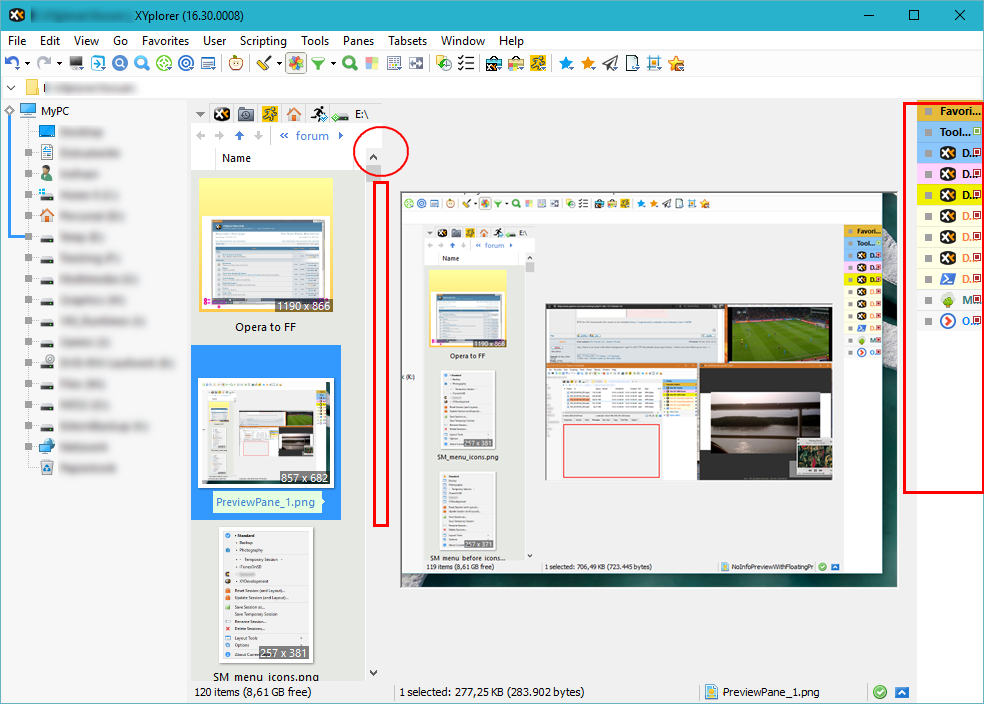
- PreviewPane_2.png (260.57 KiB) Viewed 3035 times
1) Great move, Don!
2) Great, I already can create my own
film-strip-with-loupe-mode.

3.a) Resize-handlers are obscure with "flat-mode" (and therefore handling is prone to become a new ticket-generator, see
left rectangle)
3.b) Ugly and confusing rendering (
circle)
4) There should be more user control on what is happening when enabling Preview Pane. I would like, no, I need to have an option/tweak to switch off catalog (or any other right-side view component,
right square).
5) Repeat: Film-strip mode - yeah!
Filehero
Re: Preview 2.0 - Generic Thread
Posted: 02 Mar 2016 00:51
by klownboy
For the right situations, a 2-Pane Film Strip mode works great also. For example, Pane No 1, Classical guitar videos, Pane No 2, the sheet music for associated video, and finally the preview pane to view either the video or the sheet music. Thank goodness for layouts! Looks better with no tabs in this layout.
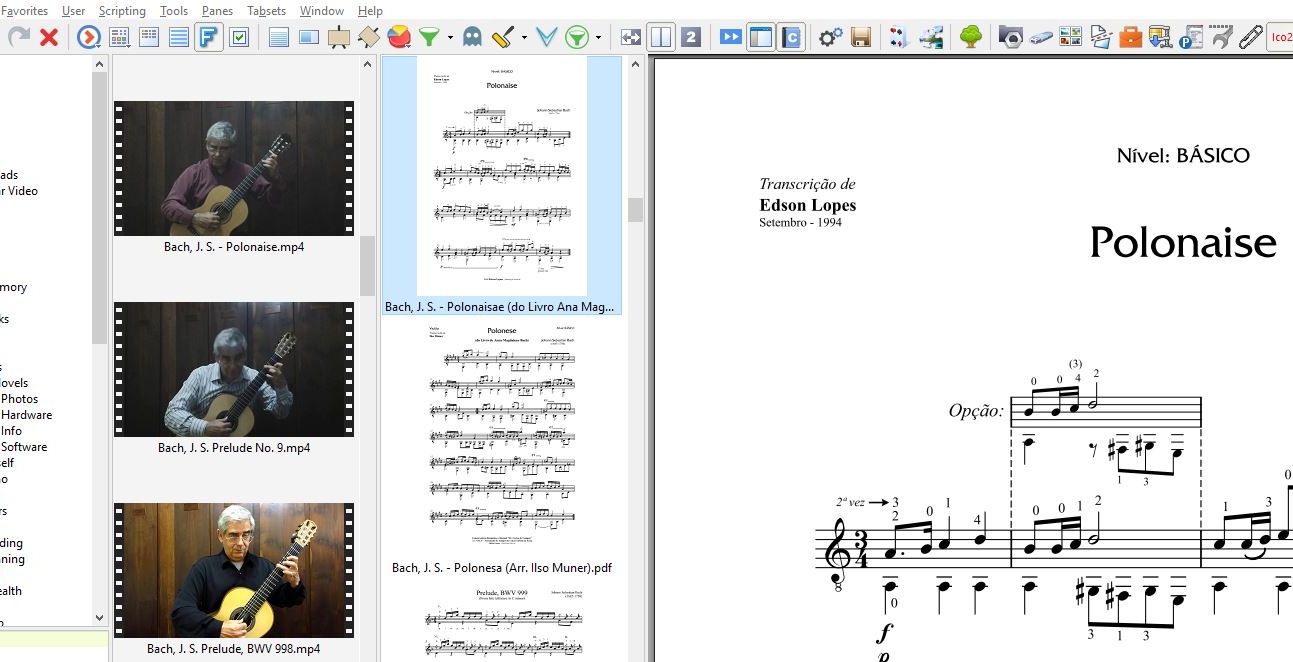
- Film Strip 2 Panes.jpg (118.54 KiB) Viewed 3026 times
Re: Preview 2.0 - Generic Thread
Posted: 02 Mar 2016 08:21
by Borut
No preview of any kind at my place (Win7) for jpg images of 3840x2160 (72dpi). I believe that there was no problem with such images for a long time. Am not sure with which of the last betas this problem has been introduced.
Re: Preview 2.0 - Generic Thread
Posted: 02 Mar 2016 13:59
by admin
TheQwerty wrote:admin wrote:It looks different here, no lines at all. No time right now to check the conditions of your look.
FYI that last image was from fresh with just FlatLook set to 1. No other settings were changed in XY.
EDIT: The key to improvement is this:
TabFlatBack=1
Made up my mind. Borders will come.

Re: Preview 2.0 - Generic Thread
Posted: 02 Mar 2016 14:18
by admin
Filehero wrote:4) There should be more user control on what is happening when enabling Preview Pane. I would like, no, I need to have an option/tweak to switch off catalog (or any other right-side view component, right square).
Uh, Ctrl+F8 usually takes care of the Catalog...
Re: Preview 2.0 - Generic Thread
Posted: 02 Mar 2016 14:34
by admin
Borut wrote:No preview of any kind at my place (Win7) for jpg images of 3840x2160 (72dpi). I believe that there was no problem with such images for a long time. Am not sure with which of the last betas this problem has been introduced.
Whatever is causing this, it's not XY.
Re: Preview 2.0 - Generic Thread
Posted: 02 Mar 2016 15:18
by binocular222
"Preview Pane: Changed its color from Window Background to Button Face"
So, which ini key? I tried ClrBtnfacePrev but not work?
Re: Preview 2.0 - Generic Thread
Posted: 02 Mar 2016 15:29
by admin
These are global system colors. They change when you change the windows theme.
Re: Preview 2.0 - Generic Thread
Posted: 02 Mar 2016 15:33
by binocular222
List's Background maybe better? When nothing is previewed, then it will blend-in with the List
Re: Preview 2.0 - Generic Thread
Posted: 02 Mar 2016 15:37
by admin
That's what I had initially. I think now it's better.
Re: Preview 2.0 - Generic Thread
Posted: 02 Mar 2016 15:44
by binocular222
The problem is it's awkward to change theme (affect other applications), while if inherit from List (or whatever XY's internal color key), then it's much more controllable.
Besides, I have 100% black List, not go so well with Button Face's grey.
Edit: I think again: It blends with statusbar, which is great too. Ok, I respect your choice.
Re: Preview 2.0 - Generic Thread
Posted: 02 Mar 2016 16:00
by TheQwerty
Don, perhaps the Preview Pane should be more similar to the Info Panel?
It could have a vertical toolbar with buttons to:
Pop-Out/Float > Show Floating Preview
Maximize > Show Full Screen Preview
Toggle Open/Close > Similar to Info Panel
With that last one it might be nice if the Preview Pane could have last/min/max sizes with toggles. (Though really we could use SetLayout to achieve this.)
Maybe even expand it into a vertical secondary customizable toolbar.

Might cut down on the requests for a second row to the toolbar.
It would at least distract me from the nearly constant dreaming that XYplorer had docking panels like Visual Studio.

Re: Preview 2.0 - Generic Thread
Posted: 02 Mar 2016 16:19
by admin
No, no, no. I love it as simple as it is. KISS.
Re: Preview 2.0 - Generic Thread
Posted: 02 Mar 2016 16:31
by klownboy
Don, Preview is looking good. I'm finding it difficult to control video other than starting and stopping with the space key. It appears you have to open the Info Panel to get the video positon and volume controls. When you then close the Info Panel, the video stops which isn't so nice. Not rushing you and I don't know what you have planned, but it might be nice to have the video control capability in a small box totally independent of the Info Panel. We don't really need the file type, length, size, format etc. as well since you can get that by hovering over the filename and it would take up too much space. Thanks.

- Video control for Preview.JPG (10.5 KiB) Viewed 2936 times