Page 8 of 21
Re: dark theme
Posted: 14 Dec 2018 23:13
by Leito
In details view, color filters are ignored and the file name is white on blue; there's no "hole"in the selection box.
Same rule could apply in all views, no?
Re: dark theme
Posted: 14 Dec 2018 23:20
by admin
It's more complex.
In Details View the other columns can show the CF colors, so the Name can be fully selected. And there is no other way to show the selection.
In Thumbnails View there are no other columns. But there is enough space to show the selection and still color the name acc. to the CF.
So, both views try to deliver the best they can.
But, I agree, that the overall impression is confusing when switching between views. So maybe it would be better to just treat all the same? I'm not sure. The price would be high.
Re: dark theme
Posted: 14 Dec 2018 23:28
by Leito
Oh yeah, I hadn't thought about that. Maybe because I'm using Full Row Select, so I've already paid the price and lost all CF on selected items in details view.
Re: dark theme
Posted: 15 Dec 2018 01:03
by 1024mb
There is a bug in the Interface Translation Tool.
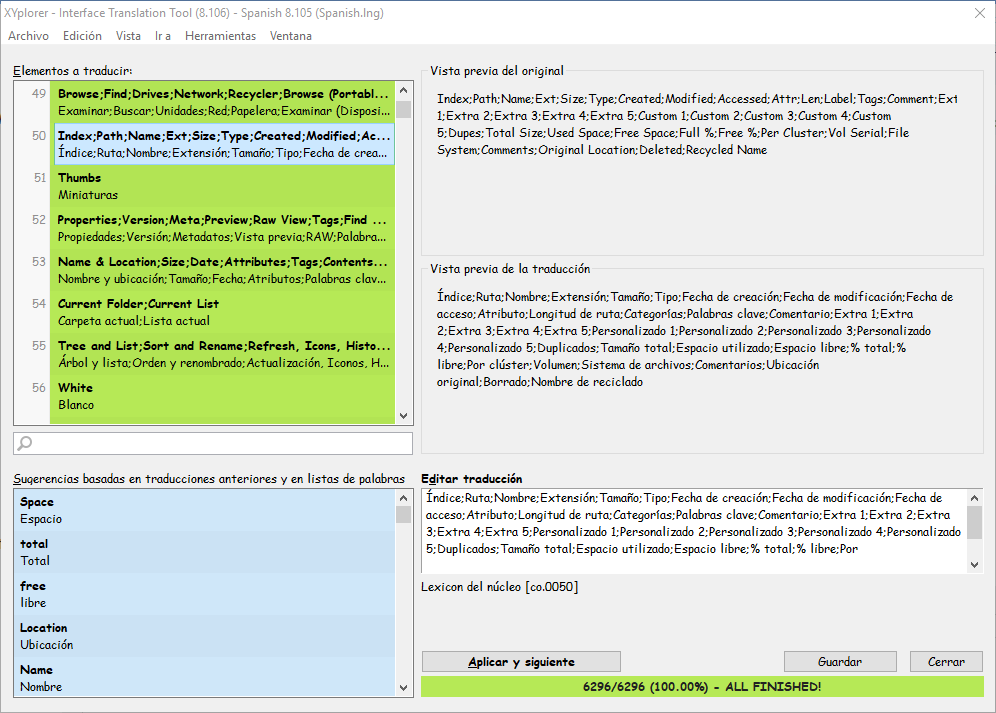
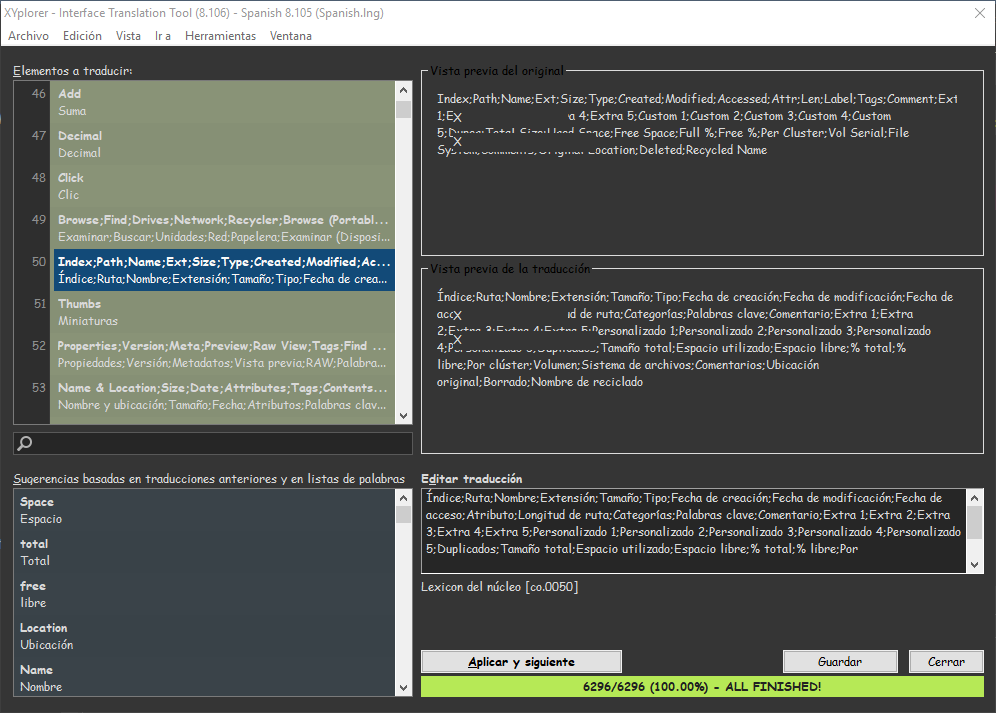
The tab borders problem is also happening to me, using Win10 latest version.
Re: dark theme
Posted: 15 Dec 2018 10:58
by admin
1024mb wrote: ↑15 Dec 2018 01:03
There is a bug in the Interface Translation Tool.
Ah yes, thanks.
Re: dark theme
Posted: 15 Dec 2018 16:25
by tomuser
Are scrollbars and title/menu bar/menu/buttons handled by Windows and not by XYplorer and because of this they still remain light?
Re: dark theme
Posted: 15 Dec 2018 16:40
by admin
Yes. Windows does not let me control them.
Re: dark theme
Posted: 15 Dec 2018 18:57
by Marco
Would it be possible to make the highlighting color of "Grid style: Highlighted groups" less contrasting and more similar to that of "Alternate groups"?
Also, I see that every highlighted group has a thick white line on bottom - why so?
And, finally, could you turn the "Dark border" even darker?
Re: dark theme
Posted: 15 Dec 2018 22:36
by Filehero
Now with the darkened tab header borders it looks really good. Well done.

I think, I'll stay with the light one. Though I use dark mode with my graphic applications or my code editor I always switch back to the light theme when using applications where the work focus isn't on a single object like an image or a few lines of code.
Re: dark theme
Posted: 16 Dec 2018 12:33
by admin
Marco wrote: ↑15 Dec 2018 18:57
Would it be possible to make the highlighting color of "Grid style: Highlighted groups" less contrasting and more similar to that of "Alternate groups"?
Also, I see that every highlighted group has a thick white line on bottom - why so?
And, finally, could you turn the "Dark border" even darker?
Sure, these were all bugs.


Re: dark theme
Posted: 16 Dec 2018 12:35
by admin
Filehero wrote: ↑15 Dec 2018 22:36
I think, I'll stay with the light one. Though I use dark mode with my graphic applications or my code editor I always switch back to the light theme when using applications where the work focus isn't on a single object like an image or a few lines of code.
I'm starting to get used to it. After working a longer time with dark, the light mode feels pretty aggressive to the eyes...
BTW, did anyone here use the
level of darkness feature?
Re: dark theme
Posted: 16 Dec 2018 12:58
by Linkaday
admin wrote: ↑16 Dec 2018 12:35
BTW, did anyone here use the
level of darkness feature?
So useful in adapting to different environment /hosting machine

Re: dark theme
Posted: 16 Dec 2018 13:16
by klownboy
admin wrote: ↑16 Dec 2018 12:35
BTW, did anyone here use the level of darkness feature?
Yes, I've tried values on both sides of 25. I've reverted back to 25, but I'm still experimenting. Great job by the way. I think I'll set up a link on the taskbar for my normal white and and a new one for dark...to accommodate my changing moods.

I haven't done that yet, but I assume the best way would be to save a separate XYplorer-dark.ini and use that on that XY start-up command line? I think that would be better than going into Configuration, changing the mode, saving, and then restarting. XY in
black and
white!
Re: dark theme
Posted: 16 Dec 2018 13:35
by admin
I'm currently working on the on-the-fly switch. Looking good. So, there will be a toolbar button...
Re: dark theme
Posted: 16 Dec 2018 15:06
by klownboy
admin wrote: ↑16 Dec 2018 13:35
I'm currently working on the on-the-fly switch. Looking good. So, there will be a toolbar button...
Ah, very good!
Edit: It should be easy coming up with an icon for that one.