 XYplorer Beta Club

Please note (and this seems to be important) that I tested the whole procedure on Windows 7 Pro setup.
First I created a test folder, copied that 30 times, and created a dummy text file.
Then I followed the advice from the previous post:
Unfortunately that did not make any difference in my case -- just as before the script went through making 14 successful copies before choking.
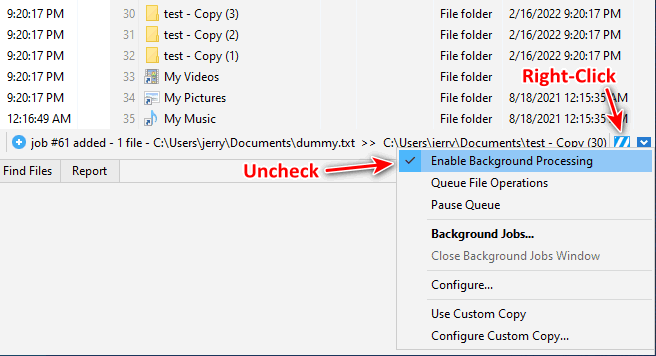
Again, in the lower right I got the stripped white-and-blue "Non-completed Background Jobs" icon turning.
However, at this point I right-clicked on the white-and-blue stripey icon, context menu popped up, and one of the options was [checked] Enable Background Processing.
So I unchecked it and retried to copy one (1) dummy file into thirty (30) test folders -- and it worked this time without a hiccup!
For Some Reason The Image Is Not Fetched, So Just Click Here
===
After that successful run I decided to test this on another computer, starting from fresh install of XYPlorer.
This time, however, the script worked as promised even before I unchecked the Enable Background Processing option.
The main difference here is the version of OS -- on the second PC I have Windows 10 ver 21H2.
So... to make the long story short, it seems that your experience with this script may vary based on the OS it's running on.