 XYplorer Beta Club
Hi all,
I've been searching for an answer on manu places but I can't find the solution. I would like to see previews of all filles, including .txt, office files and of course pdf. I'm running W8.1 64 bit. PDF works with Adobe reader installed. The basic reader installed with W8 doesn'tgive thumbs, only icons. But if I hit F11 (floating preview) I only get a black screen. And the message: no preview available. It works great with a jpg. What is going wrong? And how can I get previews of office files and .txt files? I have Office 2010 installed.
Thanks for your help,
Ruben
Floating preview pdf and previews thumbs
-
admin
- Site Admin
- Posts: 66361
- Joined: 22 May 2004 16:48
- Location: Win8.1, Win10, Win11, all @100%
- Contact:
Re: Floating preview pdf and previews thumbs
Hi there, sorry for the late reply!
Office is not yet supported by the floating preview. But PDF should work. It works here (I'm using PDF-Xchange as viewer).
Don
Office is not yet supported by the floating preview. But PDF should work. It works here (I'm using PDF-Xchange as viewer).
Don
FAQ | XY News RSS | XY X
-
Nighted
- Posts: 463
- Joined: 21 Jan 2007 01:58
- Location: Gitmo Nation North, Win 7/10/Linux/(x64)
Re: Floating preview pdf and previews thumbs
I use Sumatra PDF. I have never been able to view thumbs for PDF in XY although they display fine in explorer.
I will now go drown my misery in copious amounts of comfort foods.
I will now go drown my misery in copious amounts of comfort foods.
I want XY to serve soft ice cream. Please Don, make XY serve soft ice cream.
-
FluxTorpedoe
- Posts: 906
- Joined: 05 Oct 2011 13:15
Re: Floating preview pdf and previews thumbs
Hi'
Let's not forget that it's possible to have the best of both worlds:
- PDF-XChange viewer (free) installed, so that its shell extensions enable you to have thumbnails and preview,
- Sumatra PDF defined as the default reader (or e.g. XY's default via Portable File Associations), so you keep the speed when opening PDFs!
Working great here.
Hope this helps,
Flux
Let's not forget that it's possible to have the best of both worlds:
- PDF-XChange viewer (free) installed, so that its shell extensions enable you to have thumbnails and preview,
- Sumatra PDF defined as the default reader (or e.g. XY's default via Portable File Associations), so you keep the speed when opening PDFs!
Working great here.
Hope this helps,
Flux
• Scripts: Session Manager  | SlideShow | Collection Manager | Power Launcher | Akelpad syntax highlighting | ...
| SlideShow | Collection Manager | Power Launcher | Akelpad syntax highlighting | ...-
David.P
- Posts: 72
- Joined: 09 Dec 2006 11:21
Re: Floating preview pdf and previews thumbs
Help -- I urgently need PDF thumbnails to work, but performance is terrible.
After 3 thumbnails in a folder of 40 PDF's, XY would stop generating any more.
What's more, I don't want Mouse Down Blow Up and have deactivated it in the Configuration -- however it is still there (although incredibly slow on those PDF files).
Adobe Reader is freshly installed, also PDF-XChange Viewer. However, PDF thumbnails only work if Adobe Reader is set as standard PDF file handler.
Please help how I can fix those PDF thumbnails!
(in Windows Explorer, they work instantly in all sizes)
Regards David.P
After 3 thumbnails in a folder of 40 PDF's, XY would stop generating any more.
What's more, I don't want Mouse Down Blow Up and have deactivated it in the Configuration -- however it is still there (although incredibly slow on those PDF files).
Adobe Reader is freshly installed, also PDF-XChange Viewer. However, PDF thumbnails only work if Adobe Reader is set as standard PDF file handler.
Please help how I can fix those PDF thumbnails!
(in Windows Explorer, they work instantly in all sizes)
Regards David.P
-
Filehero
- Posts: 2731
- Joined: 27 Feb 2012 18:50
- Location: Windows 11@100%
Re: Floating preview pdf and previews thumbs
Hi David,
after just updating PDF-XChange Viewer to the latest release (2.5; build 214.2) I can
- confirm, that the preview in the info panel doesn't work anymore over here as well. Allthough it is configured not to plug into the browser it always opens the pdf in the viewer (maybe related to the "broken" Office 2013 previews)
- NOT confirm thumbnail previews are broken
I know it's a pita, but I would
- deinstall Acrobat Reader
- check wether the reg entry described in the FAQ is set
-- if no, set it & reboot
-- then reinstall PDF-XChange Viewer again (which could be done anyway)
Cheers,
Filehero
after just updating PDF-XChange Viewer to the latest release (2.5; build 214.2) I can
- confirm, that the preview in the info panel doesn't work anymore over here as well. Allthough it is configured not to plug into the browser it always opens the pdf in the viewer (maybe related to the "broken" Office 2013 previews)
- NOT confirm thumbnail previews are broken
I know it's a pita, but I would
- deinstall Acrobat Reader
- check wether the reg entry described in the FAQ is set
-- if no, set it & reboot
-- then reinstall PDF-XChange Viewer again (which could be done anyway)
Cheers,
Filehero
-
David.P
- Posts: 72
- Joined: 09 Dec 2006 11:21
Re: Floating preview pdf and previews thumbs
Yes but it takes Windows about 2 seconds to create thumbnails for my 40 PDF files (after being copied to a new folder).klownboy wrote:Windows of course automatically caches the thumbs for it's speed.David.P wrote:XYPlorer (sort of) shows PDF thumbnails -- but with terrible performance, like making the hard drive crackle away for minutes on a few dozen PDF files -- where Windows Explorer shows them instantly in all different sizes
XY takes like 5 minutes and then stops after like 7 files

Thanks @Hero, will try that.
-
David.P
- Posts: 72
- Joined: 09 Dec 2006 11:21
Re: Floating preview pdf and previews thumbs
Did it all -- no PDF thumbs in XY -- perfect as before in Windows ExplorerFilehero wrote: I know it's a pita, but I would
- deinstall Acrobat Reader
- check wether the reg entry described in the FAQ is set
-- if no, set it & reboot
-- then reinstall PDF-XChange Viewer again
-
Filehero
- Posts: 2731
- Joined: 27 Feb 2012 18:50
- Location: Windows 11@100%
Re: Floating preview pdf and previews thumbs
Just in the case you do your tests like me, that ist always taking the same folder/files for testing: you have cleared XY's thumbnail cache in between, haven't you?David.P wrote:Did it all -- no PDF thumbs in XY -- perfect as before in Windows Explorer
Cheers,
Filehero
-
Filehero
- Posts: 2731
- Joined: 27 Feb 2012 18:50
- Location: Windows 11@100%
Re: Floating preview pdf and previews thumbs
Then I'm out of ideas.David.P wrote:Yep
-
David.P
- Posts: 72
- Joined: 09 Dec 2006 11:21
Re: Floating preview pdf and previews thumbs
OK, reinstalled Adobe Reader from scratch, rebooted, PDF thumbs are (sort of) coming again in XY, but I have to press F5 as many times as there are PDF files in my folder
Every time I press F5, XY would (slowly) create ONE more thumbnail and proudly declare in the status bar "1 thumbnail created"
Every time I press F5, XY would (slowly) create ONE more thumbnail and proudly declare in the status bar "1 thumbnail created"
Last edited by David.P on 02 May 2014 22:05, edited 2 times in total.
-
David.P
- Posts: 72
- Joined: 09 Dec 2006 11:21
Re: Floating preview pdf and previews thumbs
And how can I get rid of that Mouse Down Blow In My Face thing ?!
Sorry this makes me furious
Sorry this makes me furious
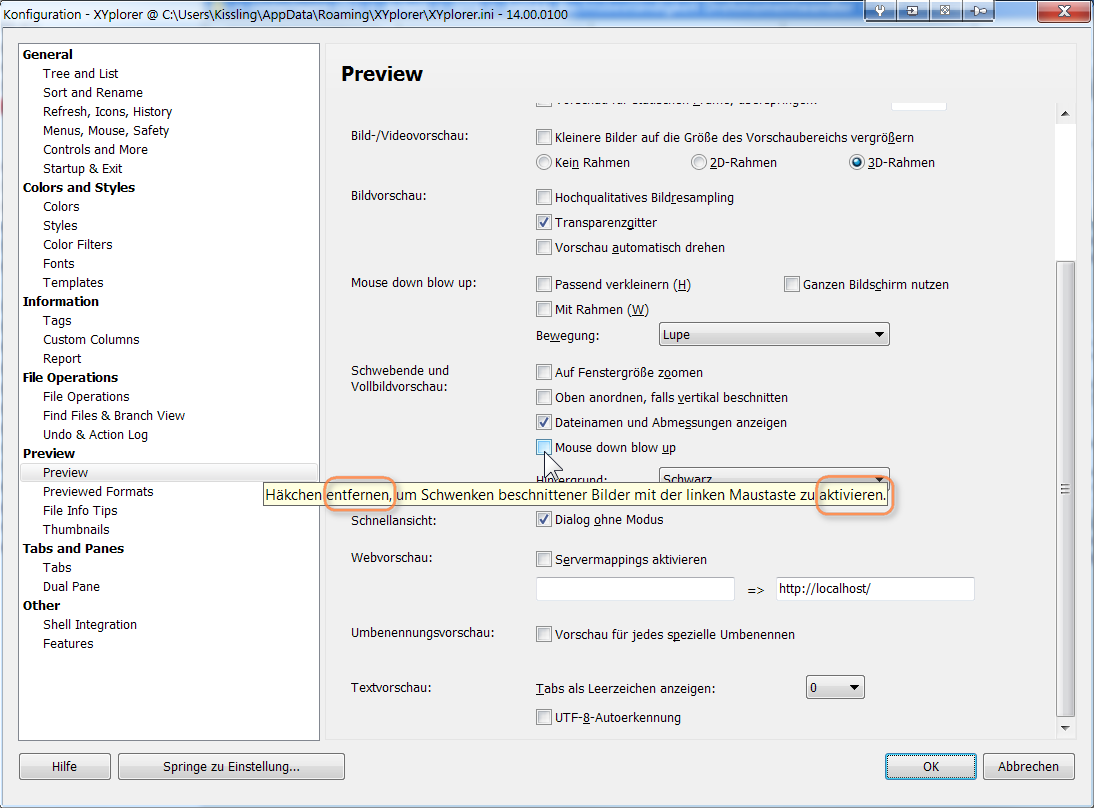

-
David.P
- Posts: 72
- Joined: 09 Dec 2006 11:21
Re: Floating preview pdf and previews thumbs
And I can't manually sort because when thumbs are shown (in thumbnails mode or in details & thumbnails mode), as soon as I try to start to drag an item, XY starts to to the Mouse Down Blow Up and won't let me drag.
Last edited by David.P on 02 May 2014 22:04, edited 2 times in total.