Page 1 of 1
Bing WTF
Posted: 29 Aug 2024 12:49
by admin
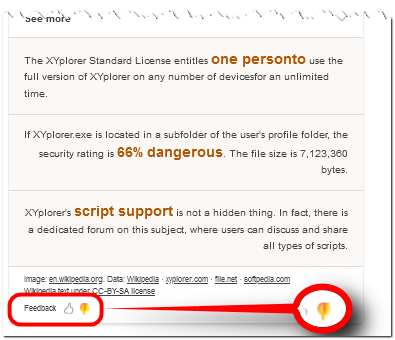
This is what you get after a Bing search for XYplorer. Uhm, WTF? Do you get the same? Friendly fire from AI?
Re: Bing WTF
Posted: 29 Aug 2024 13:04
by highend
Yeah, same here
Re: Bing WTF
Posted: 29 Aug 2024 15:00
by admin
Can only hope that people don't believe an intelligence that writes personto without a space.
Re: Bing WTF
Posted: 29 Aug 2024 19:43
by jupe
Doubtful it will help but I gave feedback, maybe if lots of us do we can influence a change.
The feedback tool actually works well inasmuch as it lets you select the exact section you are giving feedback on.
- 2024-08-30_033731.png (18.77 KiB) Viewed 7307 times
Re: Bing WTF
Posted: 29 Aug 2024 20:25
by admin
Did it

Re: Bing WTF
Posted: 30 Aug 2024 15:45
by Filehero
Seems to be gone.
Re: Bing WTF
Posted: 30 Aug 2024 16:05
by admin
Indeed!

That's a positive surprise.

Re: Bing WTF
Posted: 01 Dec 2024 18:30
by admin
Google AI just kills it (do these apps even exist?):
Re: Bing WTF
Posted: 01 Dec 2024 19:07
by Horst
What ChatGPT knows about Windows file managers:
Windows File Manager tools are applications that enhance or replace the native Windows File Explorer,
offering advanced features for managing files and directories. Here are some notable tools:
---
### 1. **Microsoft's File Explorer**
- **Included With Windows**: Default file management tool.
- **Key Features**:
- Basic file operations (copy, move, delete).
- Integrated search and quick access to frequent locations.
- Preview pane for certain file types.
---
### 2. **Third-Party File Manager Tools**
#### **1. Total Commander**
- **Features**:
- Dual-pane interface.
- Advanced search and file comparison.
- FTP/SFTP client.
- Support for plugins.
- **Best For**: Power users and developers.
#### **2. Directory Opus**
- **Features**:
- Highly customizable.
- Tabbed browsing and dual-pane views.
- Metadata editing and advanced filtering.
- FTP and archive management.
- **Best For**: Users needing advanced customization.
#### **3. XYplorer**
- **Features**:
- Tabbed browsing.
- Scripting and automation support.
- Preview of text, images, and videos.
- Portable version available.
- **Best For**: Users who want portability and scripting features.
#### **4. FreeCommander**
- **Features**:
- Dual-pane interface.
- Built-in ZIP file handling.
- Batch rename and file splitting.
- Supports plugins.
- **Best For**: A lightweight alternative to File Explorer.
#### **5. One Commander**
- **Features**:
- Modern, minimalist design.
- Tree-style dual-pane interface.
- Markdown support and file tagging.
- Built-in FTP.
- **Best For**: Users looking for a modern UI.
#### **6. Multi Commander**
- **Features**:
- Dual-pane interface.
- Advanced task automation.
- Multi-tab support.
- Plug-ins for custom functionality.
- **Best For**: Handling large and complex file operations.
#### **7. Q-Dir (Quad Explorer)**
- **Features**:
- Multi-pane interface (up to 4).
- Compact and portable.
- Easy comparison and transfer between directories.
- **Best For**: Managing multiple directories simultaneously.
#### **8. Files App**
- **Features**:
- Fluent Design (Windows 10/11 style).
- Tabbed browsing and custom themes.
- Integrated with cloud services like OneDrive and Google Drive.
- **Best For**: A modern, stylish alternative to File Explorer.
#### **9. Clover**
- **Features**:
- Adds tabbed browsing to Windows File Explorer.
- Uses a browser-like interface.
- **Best For**: Users who prefer minimal changes to the default File Explorer.
#### **10. Altap Salamander**
- **Features